 19 min read
What Is Locket App? A Complete Guide to the Locket Widget, Features, Privacy, and Safety
Locket is a photo-sharing app built around a phone widget: photos your friends take appear directly on your home screen, with no feed to scroll and nothing posted publicly. This guide explains what the Locket app is, how it works on iPhone and Android, what it shares, and whether it is safe to use.
The app is designed around smaller, more personal sharing rather than a public follower feed. Locket describes itself as a service for sharing photos and videos with friends, while its current app listings emphasize the Home Screen widget and close-friend experience. The current iPhone listing also limits users to 20 friends, although app features and limits can change over time.
That makes Locket different from apps where the main goal is to build a large audience, collect followers, or publish posts publicly.
But what exactly does Locket do? Is it available on Android and Samsung phones? What information does it need? And is Locket safe for teenagers?
This guide explains how Locket works, what the Locket widget does, what users should understand about privacy and sharing, and the main things parents and younger users should consider before using it.
What Is the Locket App?
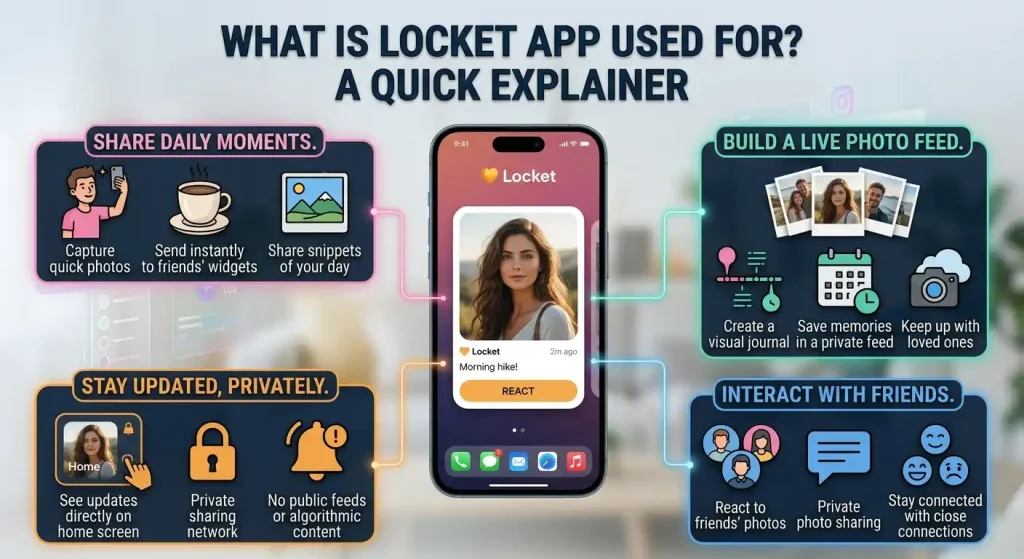
Locket is a social networking app that lets friends share photos with one another and display those photos through a Home Screen widget.
The basic experience is intentionally simple:
- Create a Locket account.
- Add friends.
- Add the Locket widget to your phone.
- Take a photo through Locket.
- Send it to your friends.
- The photo can then appear on their Locket widgets.
Instead of relying on a conventional social media timeline, Locket puts the shared photo closer to the phone’s everyday interface.
The idea is to give users quick glimpses of what their close friends are doing throughout the day.
Locket is therefore best understood as a private-feeling, small-network photo-sharing service, rather than a conventional public social network.
However, “private-feeling” does not mean that everything uploaded to Locket is automatically private in every technical sense. The company’s privacy policy explains that it collects and processes information needed to operate the service, including account information, photos and videos users choose to send, device information, usage information, and potentially contacts when permission is granted.
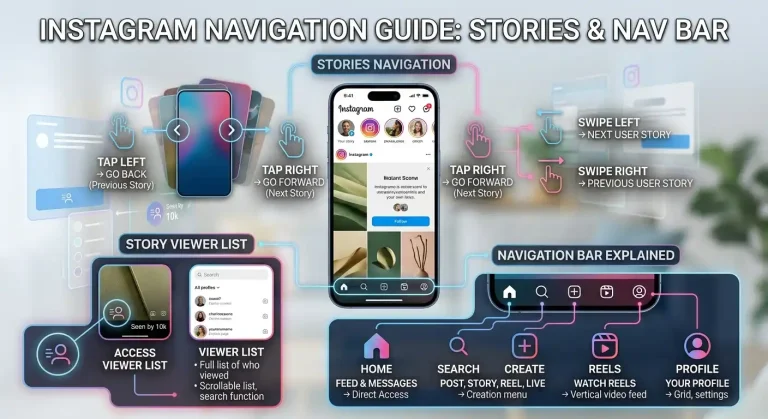
Locket focuses on sharing photos with connected friends, while other social platforms organize content through feeds, Stories, and navigation features. Our Instagram navigation guide explains what the different Story navigation actions mean.
What Is Locket App Used For?
The main purpose of Locket is to share everyday photos with friends and family.
For example, someone might use it to send:
- A photo of breakfast
- A picture from school or college
- A quick snapshot from work
- A funny moment
- A picture of a pet
- A vacation photo
- A casual selfie
- A photo that does not feel important enough for a traditional social media post
The appeal is that these small moments can appear directly on a friend’s Home Screen.
Locket also avoids some of the traditional social-media mechanics that users may find distracting. The current app description emphasizes close friends rather than follower counts and says the service is intended for friends and family.
Locket is not mainly about public posting
A useful way to understand Locket is to compare its basic purpose with a public social platform.
A traditional social network may encourage users to:
- Build a follower base
- Publish public posts
- Collect likes
- Discover strangers
- Follow celebrities and creators
- Browse a large recommendation feed
Locket’s core concept is much narrower: share photos with people you know and see their photos on your Home Screen.
That does not mean the app has no social features. It still involves accounts, contacts, user-generated content, messaging or reactions, and connections with other users.
How Does Locket Work?
Locket works by pushing photos to a widget instead of a feed. When a friend takes a photo with Locket, it is sent straight to the Locket widget on your home screen, and you can reply with a photo of your own in the same way.
Locket’s main feature is the connection between photo sharing and the Home Screen widget.
When a friend sends a photo, the image can appear through the Locket widget on your phone. You can then open Locket and send a photo back.
The current app listing describes the basic process as:
- Add the Locket widget.
- Receive a photo from a friend.
- See it through the widget.
- Tap the widget to open Locket.
- Take a photo and send it back.
This creates a simple back-and-forth photo exchange.
Why the widget matters
The widget is more than an optional decoration.
It is central to the Locket experience because it brings incoming photos outside the app itself.
Instead of:
Open app → browse feed → find friend → view post
the basic Locket experience is closer to:
Unlock phone → see friend’s photo on Home Screen
That difference is one of the main reasons Locket became recognizable as a social app.
What Is the Locket Widget?
The Locket widget is the Home Screen component that displays photos shared through Locket.
Widgets are small interactive or informational panels that can appear alongside app icons on supported phones. Locket uses this space to show photos from connected friends.
The current Locket listing describes the widget as showing live photos from best friends directly on the Home Screen.
The exact appearance can vary depending on the phone, operating system, widget size, and current version of the app.
How the Locket widget works
The general process is:
- Install Locket.
- Sign in or create an account.
- Connect with friends.
- Add the Locket widget to your Home Screen.
- Friends send photos.
- Those photos appear through the widget.
The widget can therefore make Locket feel more immediate than a conventional social feed.
Does the widget show everyone’s photos?
No.
The purpose of the service is centered around connected friends rather than an unrestricted public feed. The current listing says users can have up to 20 friends on the app.
Because features and limits can change, users should check the current version of the app if a specific limit becomes important.
Locket App on iPhone
The Locket app is available for iPhone, and the iPhone version is closely tied to the Home Screen widget experience.
The current App Store listing identifies Locket Widget as a social networking app from Locket Labs and requires iOS 15 or later. It is currently rated 13+ on the App Store.
On an iPhone, users can generally:
- Install Locket
- Create or access their account
- Add friends
- Use the Locket widget
- Receive shared photos
- Take and send photos
- Use supported reactions or messaging features
- Manage permissions through iOS settings
The exact interface can change with new releases.
Does Locket work on newer iPhones?
The current iPhone listing supports iPhones running iOS 15 or later, so compatibility depends primarily on the installed iOS version and the current app requirements rather than a specific iPhone generation.
If a particular feature does not appear, updating iOS and the Locket app is a sensible first troubleshooting step.
What Is Locket App on Android?
Locket is also available for Android.
The current Google Play listing identifies the app as Locket Widget from Locket Labs and shows more than 10 million downloads. Google Play currently categorizes it with a Teen content rating.
The Android version follows the same basic concept:
- Connect with friends.
- Add the widget where supported.
- Receive photos.
- Send photos back.
- Use Locket’s social features.
The exact appearance and available features can differ between Android devices because Android manufacturers use different versions of the operating system and different Home Screen systems.
What Is Locket App on Samsung Phones?
When people search for “what is Locket app Samsung,” they are generally asking whether Locket can be used on a Samsung Galaxy phone.
Samsung phones run Android, so Locket’s Android version is the relevant version for Samsung devices.
The important distinction is that the app is not a separate “Samsung Locket” service. It is the Android version of Locket.
Whether every widget behavior looks identical to an iPhone depends on the Android version, Samsung’s software, widget implementation, and the current Locket release.
The safest approach is to install the current Android version and check which widget and camera features are available on the particular Galaxy model.
Locket on iPhone vs Android
The central concept is the same on both platforms: Locket connects friends through photo sharing and uses a Home Screen widget as a key part of the experience.
However, there can be differences in:
| Feature | iPhone | Android / Samsung |
|---|---|---|
| Locket app | Yes | Yes |
| Photo sharing | Yes | Yes |
| Home Screen widget | Yes | Yes |
| Friend connections | Yes | Yes |
| Camera-based sharing | Yes | Yes |
| Exact interface | iOS-specific | Android-specific |
| Widget behavior | Depends on iOS | Depends on Android/device |
| App permissions | Managed through iOS | Managed through Android |
The current Android listing confirms Locket is available through Google Play, while the current iPhone listing confirms availability through the App Store.
How Locket Sharing Works
Locket is designed around direct sharing between connected users.
A typical interaction looks like this:
You take a photo → select/send it through Locket → your friend receives it → the photo appears through their Locket experience.
The recipient does not have to discover the photo through a large public feed.
This is one reason Locket can feel more personal than traditional social media.
Can you share anything through Locket?
Technically, users can upload photos and videos supported by the service.
But users should remember an important privacy rule: once you send something to another person, you cannot assume that deleting it from your own account will remove every copy or prevent the recipient from retaining it.
Locket’s privacy policy specifically states that once a photo has been sent, it cannot be deleted from another user’s phone simply by deleting it from your own.
That is an important consideration for anyone using the app, especially younger users.
Is the Locket App Safe?
There is no useful one-word answer to whether Locket is “safe.”
A better question is:
What risks and privacy considerations come with using Locket, and how can they be managed?
Locket has policies and safety measures, but it is still a social platform where people share photos, communicate, and connect with other users.
The current service has rules against harmful and illegal behavior, and Locket maintains specific standards addressing child sexual abuse and exploitation.
At the same time, users should understand what information the service handles and who can receive the content they share.
Things to consider before using Locket
Important considerations include:
- Who you add as a friend
- What photos you send
- Whether your photos contain private information
- Whether contact access is enabled
- What camera and photo permissions are granted
- What account information you provide
- Whether location-related permissions are necessary
- How you respond to unwanted messages or interactions
- Whether a shared photo could create a problem if saved or reshared
The safest social-media habit is to assume that anything sent to another person could potentially be saved or shown to someone else.
Is Locket Safe for Teens?
Locket is particularly relevant to younger users because its design is centered around close-friend sharing.
However, parents and teens should pay attention to the app’s age requirements and privacy practices.
Locket’s current App Store listing is rated 13+, while its privacy policy states that the service is not directed to children and that it does not knowingly collect personal data from anyone under 13. Locket’s terms also state that users under 13 are not authorized to use the service and that users under 18 require parent or guardian approval.
This makes age an important consideration before creating an account.
What should parents discuss with teens?
Instead of focusing only on whether the app is safe or unsafe, parents can discuss practical habits such as:
1. Only add people you actually know
A smaller friend network reduces the chance of accidentally sharing photos with strangers.
2. Think before sending
A casual photo can still contain private information such as a location, school name, address, documents, or other people.
3. Do not send sensitive images
Users should avoid sending anything that could cause harm if another person saves or shares it.
4. Understand that deletion is not guaranteed to erase another person’s copy
Once a photo reaches another person’s device, the sender cannot control everything that person does with it. Locket explicitly warns about this in its privacy policy.
5. Review permissions
Parents and teens can review which permissions Locket has been given and disable permissions that are not needed.
6. Know how to report problems
If a user encounters harassment, inappropriate content, threats, or suspicious behavior, they should use the available reporting and support mechanisms rather than continuing the interaction.
Locket App Privacy and Permissions
Privacy is one of the most important areas to understand before using Locket.
According to Locket’s privacy policy, the company may collect several categories of personal information.
These can include:
- Phone number
- Email address
- Name
- Birthday information
- Contacts, when permission is granted
- Photos and videos that users choose to send
- Device information
- IP address
- General location information
- Usage information
- Communications with support
- Information associated with messages and reactions
- Payment-related information handled by payment providers
The exact information processed can depend on how a person uses the service and which features they enable.
Does Locket access your contacts?
Locket’s privacy policy says it may access a user’s mobile contact list with permission to help users find people they know and connect with them.
This means contact access is an important permission to understand before enabling it.
Users can manage this permission through their phone’s settings.
Does Locket collect location information?
Locket’s privacy policy says it collects general location information such as city, state, or geographic area as part of automatically collected device information.
The current iPhone App Store privacy disclosure also lists coarse location among data that may be linked to the user and used for purposes including analytics, advertising, personalization, and app functionality. Apple notes that the privacy information is supplied by the developer and has not been verified by Apple.
This is a good example of why users should not judge an app’s privacy only by whether it is a “friends-only” social network.
Does Locket collect photos?
Yes.
Locket’s privacy policy explains that when you choose to send a photo or video to a friend’s Locket Widget, the service receives the photo or video and associated metadata such as file type, file size, and the time it was taken.
That does not mean every photo stored on your phone is automatically uploaded simply because Locket is installed. The relevant distinction is between content you choose to provide to the service and information collected through the app’s normal operation.
Users should still review the photo permissions presented by their operating system.
Locket Privacy: What Users Should Pay Attention To
The most important privacy questions are not simply “Does Locket collect data?”
Instead, ask:
- What data does the app collect?
- Why does it need that data?
- Which permissions have I granted?
- Who can see the photos I send?
- Can another person save or share my photos?
- Can I delete my account?
- What happens to information after deletion?
- What advertising or analytics data is used?
Locket’s policy says users can request deletion of personal data in certain circumstances and can delete their account through account settings. It also provides choices concerning marketing, tracking, and certain forms of advertising-related data sharing, depending on the user’s location and applicable law.
Privacy policies can change, so users should check the current policy rather than relying on an old description of the app.
Locket App Review: Features, Limitations, and Things to Know
A useful Locket app review should look beyond ratings and ask whether the app’s design fits the way someone actually wants to communicate.
What Locket does well
Simple photo sharing
The basic concept is easy to understand. You share a photo with friends and see their photos through the widget.
Home Screen integration
The widget makes the experience different from a conventional social-media feed.
Smaller friend network
The current iPhone listing describes a limit of 20 friends, which encourages a smaller network rather than a huge audience.
Casual communication
Locket works well for small everyday moments that users might not otherwise post publicly.
Available on major mobile platforms
Locket currently has versions for iPhone and Android, making the basic service available across both major mobile ecosystems.
Limitations to understand
It still requires trust
Calling something a close-friends app does not eliminate the possibility that a recipient may save or share what you send.
Privacy is more complicated than the widget suggests
The visible experience is simple, but the service processes account, device, usage, and user-generated information.
Features can differ by platform
iPhone and Android versions may not always behave identically.
The app is not intended for children under 13
The company’s policy and terms make the under-13 restriction clear.
Social interaction still carries normal social-media risks
Users should consider unwanted contact, inappropriate content, oversharing, and pressure from other users.
Locket vs Traditional Social Media
Locket’s biggest difference is not necessarily the ability to share a photo. Many apps can do that.
The difference is where and how the photo is presented.
A traditional social platform might focus on:
- Public or semi-public posts
- Followers
- Likes
- Comments
- Recommendations
- Large feeds
- Creator content
Locket focuses more heavily on:
- Close friends
- Quick photos
- Home Screen visibility
- Small groups
- Everyday moments
This makes it closer to a lightweight visual communication tool than a traditional public content platform.
Does Locket Have a Public Feed?
Locket’s core experience is not built around an unrestricted public feed.
The service is designed around connecting with friends and displaying photos from those connections.
That said, Locket remains a social platform with user accounts, user-generated content, interactions, and connection features. Users should therefore still apply normal social-media privacy habits.
What Information Does Locket Need to Create an Account?
Locket’s privacy policy says account creation can involve information such as a phone number, email address, full name, and birthday information.
The exact registration process can change as the service evolves.
The important point is that Locket is not simply a standalone offline camera widget. It is a connected social service, so account and service-related information are part of the experience.
Can You Delete Your Locket Account?
Locket’s privacy policy states that users can delete their account through account settings.
However, account deletion and deletion of content already received by another user are not necessarily the same thing.
This distinction is particularly important with social photo apps.
Deleting your account does not mean you can retroactively control copies of a photo that another person has already received, saved, or otherwise retained.
Should You Use Locket?
Whether Locket makes sense depends on what you want from a social app.
It may appeal to someone who wants:
- A small circle of friends
- Casual photo sharing
- A Home Screen widget
- Less emphasis on follower counts
- Quick visual updates
- A simple way to stay connected with close friends
It may be less suitable for someone who:
- Does not want to share photos through a cloud-connected social service
- Wants complete control over copies of shared photos
- Prefers a traditional messaging app
- Does not want to grant social-app permissions
- Wants a public creator-focused platform
The most important point is that Locket should be understood as a social photo-sharing service with a widget, not simply as a decorative widget.
Final Thoughts on What Is Locket App
So, what is Locket app?
Locket is a social photo-sharing app designed around close friends and a Home Screen widget. Friends can send photos to each other, and those photos can appear directly through the Locket widget rather than requiring users to browse a traditional social feed. The service is available on both iPhone and Android, including Android phones such as Samsung Galaxy devices.
The app’s appeal comes from its simplicity and small-network approach.
However, the privacy side deserves equal attention. Locket’s policies indicate that the service processes account information, photos and videos, device information, usage information, and other data depending on how the service is used. Contact access can also be enabled with permission.
For teenagers, age requirements and parental involvement are particularly important. Locket’s current policies prohibit use by children under 13, while its terms state that users under 18 need parent or guardian approval.
Rather than asking whether Locket is simply “safe” or “unsafe,” users and parents should look at the specific permissions, sharing behavior, friend list, content being exchanged, and privacy settings involved.
That gives a much more useful picture of what using Locket actually means.
Curious about other internet culture phenomena? The Unsent Project is an anonymous-message art archive with its own color system and search.
Common Locket App Questions
Is Locket the same as a messaging app?
Not exactly. Locket includes social communication features, but its defining feature is photo sharing through the Home Screen widget. It is designed more around visual updates between friends than conventional one-to-one text messaging.
Can people outside my friend list see my Locket photos?
The core experience is based on sharing with connected friends rather than publishing photos to a general public feed. However, users should remember that a recipient can potentially save or share content they receive.
Does Locket work without the widget?
The widget is central to the Locket experience, but the app itself is also used to take photos, manage connections, and access other features. The exact functionality can change between versions and operating systems.
Can parents control whether a teenager uses Locket?
Parents can discuss and manage the device, account, permissions, and usage rules applicable to their child. Locket’s own terms state that users under 18 require parent or guardian approval, and the service is not authorized for children under 13.
FAQs
Does Locket show photos immediately?
Locket is designed for near-immediate photo sharing through the widget, but actual delivery and display can depend on internet connectivity, device settings, notifications, widget behavior, and the app version.
Can Locket photos contain location information?
Photos can contain associated metadata, and Locket’s privacy policy says it receives metadata associated with photos and videos that users send. Device and general location information may also be collected separately as part of operating the service.
What happens if I send a photo to the wrong person?
The safest assumption is that you should treat a sent photo as shared content that you may no longer be able to control completely. Locket specifically states that deleting a photo from your own device does not delete it from another user’s phone.
Why might Locket look different on two phones?
Locket can look or behave differently because iOS and Android have different widget systems, permissions, operating-system versions, device manufacturers, and app releases. A Samsung Galaxy phone, for example, may present Android widget behavior differently from an iPhone.