 20 min read
Instagram Navigation: What Does It Mean?
Instagram Navigation can mean two different things, which is why the term can be confusing.
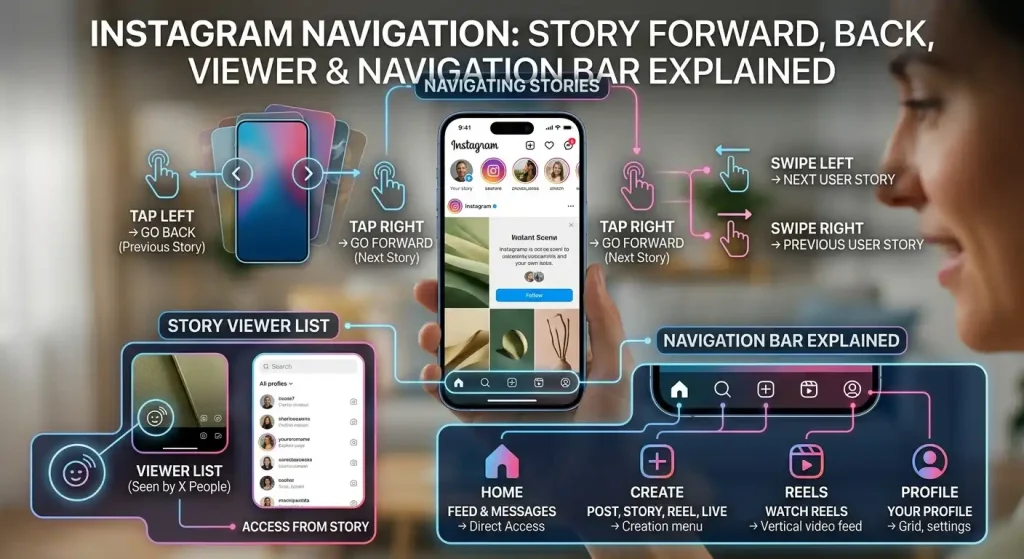
In Instagram Stories, Navigation is a set of metrics that shows how viewers moved through your Story. It includes actions such as Forward, Back, Next Story, and Exited.
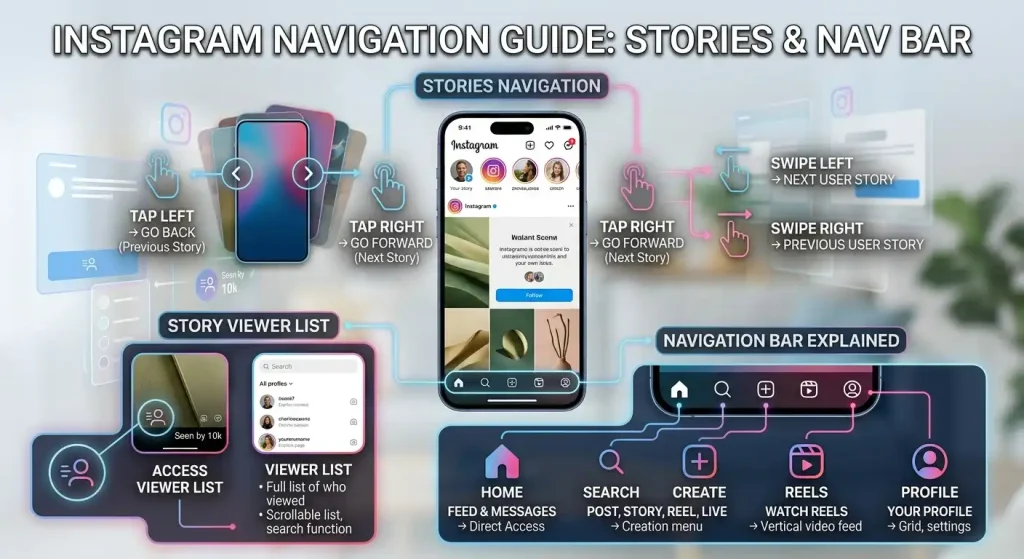
But Instagram also has a navigation bar inside the app. This is the interface that lets users move between major areas such as the Home feed, Search, Reels, activity, and their profile, although the exact layout can change between versions, devices, and account experiences.
These are separate concepts.
If you are looking at Instagram Story Insights, Navigation refers to viewer actions.
If you are talking about the buttons at the bottom of the Instagram app, you are talking about the Instagram navigation bar.
This guide explains both meanings, with particular attention to Story Navigation, Forward and Back actions, Story viewers, anonymous viewing, Highlights, followers, and interface changes.
Instagram Navigation: Quick Answers
- Back — the viewer tapped back to rewatch your previous story segment. Usually a good sign: something was worth a second look.
- Forward — the viewer tapped forward to skip to your next story segment. Normal pacing; a spike on one segment suggests that segment dragged.
- Next Story — the viewer swiped on to a different account’s story. They lost interest in your sequence, not in Stories as a whole.
- Exited — the viewer left the story viewer altogether. Neutral on its own, unless exits spike repeatedly on the same segment.
What Is Instagram Story Navigation?
Instagram Story Navigation is the collection of actions viewers take while moving through a Story sequence.
Current Instagram Insights documentation and 2026 guides describe four key navigation actions:
| Navigation metric | What the viewer did |
|---|---|
| Forward | Moved to the next frame in your Story |
| Back | Returned to a previous frame |
| Next Story | Moved to another account’s Story |
| Exited | Left the Stories viewer |
The important point is that these are actions, not direct measurements of whether somebody liked or disliked your content.
For example, a Forward tap tells you that the viewer moved to the next Story frame. It does not tell you exactly why.
They might have:
- Finished reading quickly
- Wanted to reach the next frame
- Seen the information before
- Found the frame too slow
- Been browsing quickly
- Simply preferred controlling the pace
That is why Navigation should be interpreted alongside other Story metrics rather than treated as a simple score.
Instagram Story Navigation: The Four Main Actions
The easiest way to understand Instagram Navigation is to separate the four actions.
Forward
Forward means the viewer moved to the next frame in your Story.
If you publish five Story frames and someone taps through from frame two to frame three, that movement can be recorded as a Forward action.
Forward does not mean that the viewer left your account.
They are still moving through your Story.
Back
Back means the viewer returned to a previous Story frame.
A viewer might go back because:
- They wanted to reread something.
- They missed information.
- They wanted to look at an image again.
- They wanted to replay part of the sequence.
A Back action can therefore be useful to notice, but it does not automatically prove that the viewer loved the content.
Next Story
Next Story is different from Forward.
Forward moves to your next Story frame.
Next Story moves the viewer to another account’s Story.
That distinction is important when analyzing Story performance.
Exited
Exited means the viewer left the Stories viewing experience.
This is different from Next Story.
With Next Story, the person continues watching Stories but moves to another account.
With Exited, they leave the Stories viewer altogether.
An Exit also does not automatically mean the viewer disliked the Story. Someone might simply have finished watching Stories or decided to return to another part of Instagram.
Instagram Story Navigation Forward: What Does It Mean?
The Instagram story navigation forward meaning is straightforward at the technical level:
The viewer tapped forward to move to the next frame of your Story.
The interpretation is more complicated.
A Forward action should not automatically be labeled negative.
Imagine a Story containing:
- A question
- An explanation
- An answer
- A recommendation
A viewer may quickly tap through the first two frames because they already understand the subject and want to reach the recommendation.
That produces Forward actions without necessarily indicating that the Story was unsuccessful.
When Forward becomes more interesting
Look at where Forward actions occur.
If a particular frame receives substantially more Forward actions than surrounding frames, that may be worth investigating.
For example:
- Frame 1: normal navigation
- Frame 2: very high Forward
- Frame 3: normal navigation
Frame 2 deserves closer examination.
Perhaps it contains too much text, takes too long to communicate its point, or repeats information already established.
But the metric itself does not tell you which explanation is correct.
What Does Backward Navigation Mean on Instagram Stories?
Backward navigation, or a Back action, means that a viewer returned to a previous Story frame.
It is often interpreted as a sign that something on the previous frame deserved another look.
That could be:
- A useful tip
- A product detail
- A complicated explanation
- A piece of text that was too quick to read
- An image
- A link or instruction
- A detail the viewer missed
For example, if you post a three-step tutorial and the second frame receives many Back actions, viewers may be returning to check the instructions.
That is potentially useful information.
However, Back is not proof of positive sentiment.
A viewer could also go backward because the previous frame was confusing or because they missed something.
The safest interpretation is:
Back tells you that the previous frame was revisited. It does not tell you exactly why.
Forward vs Back on Instagram
The difference is simple:
| Action | Viewer movement |
|---|---|
| Forward | Moves to the next frame |
| Back | Returns to a previous frame |
The interpretation should remain equally careful.
Forward does not automatically mean “bad.”
Back does not automatically mean “good.”
The context of the Story sequence matters.
A high Forward count on a short, easy-to-read frame may be completely normal.
A high Back count on a complicated tutorial could simply mean people needed more time to understand it.
Instagram Story Viewer and Navigation
The Instagram navigation story viewer relationship is another common source of confusion.
The Story viewer information tells you about people who viewed your Story.
Navigation metrics tell you about actions taken while moving through your Story.
These are related but different types of information.
For example, knowing that 500 accounts viewed a Story does not tell you that 500 people each made a Forward action.
Navigation records actions, and the same viewer can potentially generate multiple navigation actions while moving through a sequence.
This means Navigation counts should not automatically be interpreted as the number of unique people.
Viewer list vs Navigation metrics
Think about them this way:
Story viewers:
“Who viewed my Story?”
Navigation:
“How did viewers move through my Story?”
Reach:
“How many accounts did the content reach?”
Impressions/views:
“How many times was the content displayed or viewed under the relevant metric definition?”
These answer different questions.
Can Instagram Navigation Show Who Viewed Your Story?
No. Navigation metrics do not provide a list showing which individual person tapped Forward, Back, Next Story, or Exited.
The Navigation section provides aggregate action data.
You may be able to see Story viewers through Instagram’s viewer interface, depending on the Story and account experience, but that does not mean Instagram identifies which specific viewer generated each navigation action.
This is an important privacy distinction.
You should not interpret:
“50 Forward actions”
as:
“These 50 specific people tapped Forward.”
The metric is an aggregate measurement.
Instagram Navigation Anonymous: Can Someone Navigate Your Story Anonymously?
Instagram’s normal Story viewing system does not provide a general anonymous-viewer mode that lets someone watch your Story while hiding their identity from the Story owner.
Third-party websites and applications may advertise anonymous Instagram Story viewing, but claims made by those services should be treated cautiously.
An external viewer service may have its own limitations, privacy risks, or requirements, and using an external service does not change what Instagram itself records.
There is also an important distinction between anonymous viewing claims and Instagram’s own Navigation metrics.
Instagram Navigation does not provide a secret list of anonymous users who performed specific actions.
If you are analyzing your own Story Insights, you should rely on the information Instagram provides rather than assuming that a third-party viewer has given you hidden viewer identities.
Instagram Navigation and Followers
Navigation can be useful when analyzing how your existing audience interacts with Stories.
Many Story viewers may already follow the account, while others may encounter Stories through different discovery paths depending on Instagram’s current distribution systems.
But Navigation itself does not tell you:
- Whether a viewer follows you
- Which specific follower tapped Forward
- Which individual follower exited
- Why a particular person navigated away
Follower information and Story navigation are separate pieces of data.
For content analysis, you can compare broader account-level audience and Story performance information, but you should not treat Navigation as a follower-identification tool.
Instagram Navigation Bar: What Is It?
The Instagram navigation bar is the part of the app interface used to move between major areas of Instagram.
Its exact appearance can change over time.
Depending on the current Instagram version and account experience, the navigation interface can provide access to areas such as:
- Home
- Search
- Reels
- Activity
- Profile
Instagram has experimented with different interface layouts and placements over the years.
This means screenshots from an older version of Instagram may not exactly match what you see today.
That is one reason searches for Instagram navigation update can produce different answers depending on when an article or video was published.
Instagram Navigation Bar vs Story Navigation
These terms should not be mixed together.
| Instagram navigation term | Meaning |
|---|---|
| Navigation in Story Insights | Viewer actions inside your Stories |
| Navigation bar | App interface for moving between Instagram sections |
| Forward | Moves to the next Story frame |
| Back | Returns to a previous Story frame |
| Next Story | Moves to another account’s Story |
| Exited | Leaves the Stories viewer |
If you searched for Instagram Navigation because you saw “Navigation” inside Story Insights, you are looking for the first category.
If you are asking where Instagram’s Home, Search, Reels, and Profile controls went, you are asking about the second.
Instagram Navigation in Stories vs Highlights
Instagram Stories and Highlights are closely related, but they are not identical features.
Stories are temporary posts that normally disappear from the active Story sequence after their standard availability period.
Highlights allow selected Stories to remain accessible on a profile after they are no longer part of the active Story sequence.
This creates another common source of confusion around Instagram navigation Highlights.
Does Story Navigation work exactly the same in Highlights?
Not necessarily.
Instagram’s available metrics and interface can change over time, and the analytics shown for active Stories, archived Stories, and Highlights are not necessarily identical.
Do not assume that a Navigation number visible in one part of Instagram has exactly the same meaning or availability everywhere else.
If you are reviewing analytics for a specific Highlight, use the metrics currently displayed by Instagram for that account and feature.
How Story Navigation Can Help Analyze Content
Navigation becomes more useful when you compare multiple Stories instead of looking at one number.
For example, imagine three Story frames:
| Frame | Forward | Back | Next Story | Exited |
|---|---|---|---|---|
| 1 | 20 | 2 | 3 | 1 |
| 2 | 55 | 8 | 5 | 2 |
| 3 | 15 | 1 | 2 | 20 |
Frame 2 has more Forward actions, but it also has more Back actions.
That could mean viewers were moving through it quickly while some people were also returning to it.
Frame 3 has many Exits, which makes it worth investigating.
But the numbers alone do not tell you the reason.
You would need to look at the actual content:
- Was the frame too long?
- Did the topic change?
- Was there a call to action?
- Was the frame confusing?
- Was it simply the final frame?
The last question matters because an Exit on the final frame is very different from an Exit halfway through a six-frame sequence.
Should You Worry About High Forward Navigation?
Not automatically.
Stories are designed for quick, tap-based browsing.
Some users move rapidly through almost every Story they see.
A Forward action can therefore be completely normal.
It becomes more useful when you compare:
- Forward
- Back
- Next Story
- Exited
- Replies
- Sticker interactions
- Other available Story metrics
A single number rarely explains audience behavior by itself.
Current 2026 analysis guides similarly emphasize reading the four Navigation actions together rather than assigning a universal positive or negative meaning to one metric.
What Does a High Back Count Mean?
A high Back count means viewers returned to earlier Story frames more frequently.
Possible explanations include:
- The content was worth revisiting.
- A viewer wanted to reread text.
- The previous frame contained useful information.
- The sequence moved too quickly.
- The viewer accidentally moved forward and returned.
Therefore, Back is best treated as a behavioral clue, not a guaranteed engagement score.
If the same frame repeatedly receives Back actions across multiple Story sequences, it may be worth studying what makes that frame different.
What Does Next Story Mean?
Next Story means the viewer moved away from your Story sequence to another account’s Story.
This is different from Forward.
Forward
Your next Story frame.
Next Story
Another account’s Story.
That distinction is particularly useful when analyzing retention.
Someone who taps Forward is still consuming your sequence.
Someone who selects Next Story is no longer viewing your Story sequence.
However, the metric still does not tell you why.
The viewer could have finished with your content, become interested in another account, or simply been browsing rapidly.
What Does Exited Mean?
Exited means the viewer left the Stories viewing experience.
An Exit can happen because:
- They finished watching Stories.
- They returned to the feed.
- They closed the viewer.
- They became distracted.
- They reached the end of the sequence.
- They no longer wanted to continue.
Therefore, an Exit should be interpreted according to where it occurs.
An Exit at the end of a Story sequence is not equivalent to an Exit immediately after the first frame.
How to Find Instagram Story Navigation Data
For accounts with access to Instagram Insights, Story performance data can be found through the account’s professional analytics interface.
The exact menu names and layout can change as Instagram updates its interface.
A typical workflow is:
- Open Instagram.
- Go to your profile.
- Open Insights.
- Go to your Story/content performance area.
- Select the Story you want to analyze.
- Look for the available navigation or interaction metrics.
For an active Story, Instagram may also expose performance information directly from the Story viewer.
The exact availability depends on account type, feature rollout, Story age, and Instagram’s current interface.
Instagram Navigation Update: Why Does My Interface Look Different?
Instagram frequently changes parts of its interface.
An Instagram navigation update may change:
- Where buttons appear
- Which tabs are visible
- How the navigation bar is arranged
- Where Reels are accessed
- Where notifications/activity appear
- How profile controls are presented
Not every account necessarily receives the same interface at exactly the same time.
Instagram also performs tests and staged rollouts, which can result in different users seeing different layouts.
Therefore, if a tutorial published several years ago shows a navigation bar that does not match your phone, the tutorial may simply be outdated.
Before troubleshooting your account, check:
- Your Instagram app version
- Your operating system
- Whether the account has received a different interface rollout
- Whether the feature is available in your region
- Whether you are using the mobile app or web version
Instagram Navigation on Mobile vs Web
Instagram’s navigation experience can differ between:
- iPhone
- Android
- Mobile browser
- Desktop browser
The core concepts remain recognizable, but controls can be positioned differently.
For example, a mobile-first Story experience uses touch gestures, while desktop interfaces can use buttons or other controls.
This is another reason not to rely on an old screenshot as proof that your current Instagram interface is incorrect.
Instagram is not the only app built around sharing updates with friends. If you are exploring other social apps, our guide explains what the Locket app is used for and how its widget-based sharing works.
Common Instagram Navigation Confusions
“Forward” means they skipped my entire Story
Not necessarily.
Forward normally moves the viewer to the next frame within your Story sequence.
“Next Story” means they exited Instagram
Not necessarily.
Next Story means they moved to another account’s Story. They may continue watching Stories.
“Exited” means they disliked my Story
Not necessarily.
An Exit tells you what happened, not why it happened.
“Back” means they loved my Story
Not necessarily.
They may have wanted to reread something, review an image, or correct an accidental tap.
“Navigation” means my Instagram bottom bar
Not when you are looking at Story Insights.
In Story Insights, Navigation refers to viewer actions.
“Anonymous navigation” lets someone secretly interact with my Story
There is no general Instagram feature that gives Story viewers a hidden identity specifically because they navigated anonymously.
How to Read Instagram Navigation More Accurately
Instead of asking:
“Is Forward good or bad?”
ask:
“Where are people moving, and at which frame does their behavior change?”
That gives you more useful information.
Compare similar Stories
If one Story receives substantially different navigation behavior from another similar Story, investigate the content difference.
Look at the sequence
Do not judge a frame without considering what came before it.
Check the final frame
An Exit at the end may be completely normal.
Compare Forward with Next Story
Forward keeps the viewer in your sequence.
Next Story moves them to another account.
Look for repeated patterns
One unusual Story is less informative than the same pattern appearing across multiple posts.
Instagram Navigation and Content Strategy
Navigation data can help creators identify parts of a Story sequence that deserve more attention.
For example, if viewers repeatedly return to a particular frame, examine:
- Its topic
- Visual design
- Amount of text
- Information density
- Hook
- Product or feature shown
- Question being answered
If viewers repeatedly move forward through another type of frame, examine whether those frames are:
- Too long
- Repetitive
- Too predictable
- Too text-heavy
- Too slow to communicate the main point
But avoid turning these observations into rigid rules.
Instagram does not publish a universal formula saying that a certain Forward or Back percentage means a Story is successful or unsuccessful.
Your own account’s historical patterns are usually more useful than arbitrary benchmarks.
Instagram Navigation: A Simple Example
Suppose you publish four Stories:
Story 1: “Here’s the problem.”
Story 2: “Here’s what causes it.”
Story 3: “Here’s the solution.”
Story 4: “Here’s where to get more information.”
If Story 1 gets many Forward taps, viewers may simply want to reach the explanation.
If Story 2 receives many Back actions, people may be rereading the explanation.
If Story 3 receives many Next Story actions, that frame may deserve investigation.
If Story 4 receives many Exits, that could simply be because viewers reached the end.
The numbers become useful when connected to the actual sequence.
The Difference Between Navigation and Engagement
Navigation is not the same as engagement.
A viewer can:
- Watch a Story
- Tap Forward
- Tap Back
- Move to another Story
- Exit
without liking, commenting, replying, sharing, or clicking a sticker.
Navigation describes movement through the Story experience.
Other metrics describe different forms of interaction.
This distinction prevents a common mistake: treating every navigation action as an expression of approval or disapproval.
Instagram Navigation and Privacy
Story Navigation provides aggregate performance information rather than a private activity log showing every action by every viewer.
You should therefore avoid third-party claims that promise to reveal exactly who:
- Tapped Forward
- Tapped Back
- Exited
- Moved to another Story
Instagram’s normal Insights interface does not turn those aggregate Navigation metrics into an individual action history.
If an external tool claims it can reveal private viewer behavior that Instagram itself does not show, treat that claim carefully.
Instagram Navigation: What You Actually Need to Remember
There are two different meanings of Instagram Navigation.
Story Navigation describes how viewers move through Stories:
- Forward — next frame in your Story
- Back — previous frame
- Next Story — another account’s Story
- Exited — leaves the Stories viewer
The navigation bar is part of Instagram’s interface and lets users move between major areas of the app.
The most important analytical rule is not to label any individual navigation action as automatically good or bad.
Forward does not automatically mean disinterest.
Back does not automatically mean admiration.
Next Story does not necessarily mean someone disliked your account.
Exit does not necessarily mean the Story failed.
The action tells you what happened. The surrounding context helps you understand why it may have happened.
How to See Who Someone Recently Followed on Instagram
The quick answer: There is no official way to see who someone recently followed on Instagram in chronological order. The Following list on a profile is sorted by Instagram’s algorithm — not by who was followed most recently. Anyone promising an exact “recently followed” list is selling something Instagram doesn’t offer.
Instagram’s Following list used to show accounts newest-first, but Instagram removed the “Date followed” sorting. The list is now ordered algorithmically, based on interactions — whose posts get liked, whose stories get watched, whose profiles get visited. So the accounts at the top of someone’s Following list are the ones Instagram considers most relevant, not the most recently followed.
What you can still try:
- Check their recent likes and comments. When someone follows a new account, they often like or comment on its posts soon after. This only works if both accounts are public and active.
- Look at tagged photos and collab posts. New follows often come with tags or shared posts.
- Watch their stories. People frequently share or mention accounts they just started following.
What to avoid: third-party apps and websites claiming to show “who someone recently followed.” They usually ask for your Instagram login, violate Instagram’s terms, and are a common route to hacked accounts. Instagram actively restricts accounts that use them.
Instagram Story Viewer Order: How It Actually Works
The quick answer: Your story viewer list is not random, and it’s not simply who watched first. Once a story passes roughly 50 views, Instagram sorts viewers by algorithm — people you interact with most appear at the top.
- Under ~50 viewers: the list is roughly reverse-chronological, with the most recent viewer on top.
- Over ~50 viewers: Instagram switches to algorithmic ranking. Viewers you engage with most — likes, DMs, profile visits, story replies — move to the top regardless of when they watched.
Common myths, cleared up:
- The person at the top is not necessarily stalking your profile — it’s usually someone you already interact with heavily.
- A high position does not mean they rewatched your story multiple times or took a screenshot.
- You cannot see how many times one person rewatched — only that they viewed it.
Commonly Asked Questions
Can someone see that I tapped Forward on their Instagram Story?
Instagram does not normally show the Story owner a list identifying which specific person performed each Forward action. Navigation is presented as aggregate Story performance data rather than an individual action log.
Does Instagram Navigation count unique viewers?
Not necessarily. Navigation measures actions, and one viewer can perform multiple actions while moving through a Story sequence. Therefore, Navigation totals should not automatically be interpreted as unique people.
Can Instagram Navigation be used to identify unfollowers?
No. Navigation metrics do not identify which individual viewer followed or unfollowed an account. Follower information and Story Navigation are separate concepts.
Why does my Instagram navigation bar look different from someone else’s?
Instagram can change its interface and roll out different layouts or features at different times. Differences can also come from the app version, device, account, or platform being used.
Can you see exactly who someone recently followed on Instagram?
No. Instagram removed chronological sorting from the Following list, so there is no official way to see recent follows in order. The list is sorted by Instagram’s algorithm based on interactions.
Why is someone’s Instagram Following list not in order?
Because it’s not meant to be chronological anymore. Instagram orders the Following list algorithmically — accounts you (or they) interact with most appear first.
Does the first person on my story viewers list stalk my profile?
No. The top of the viewer list shows people you interact with most, not who watches most obsessively. It’s a reflection of your own activity, not theirs.