 11 min read
Best Mini PCs in 2026: Gaming Powerhouses, Prices & Where to Buy
The quick answer: The best mini PC for most people in 2026 is the Minisforum AtomMan G1 Pro — it packs a real RTX 5060 graphics card into a tiny chassis for around $1,495 / £1,359. On a budget, the Minisforum Venus UM790 Pro (around $871 / £779) handles everyday work and light 1080p gaming. For no-compromise gaming, the ASUS ROG NUC with RTX 5070 graphics is the strongest option at around $2,500 / £2,709.
A mini PC is a complete desktop computer shrunk down to roughly the size of a paperback book. It runs full Windows, connects to your monitor, keyboard, and mouse, and in 2026 some models are powerful enough to play demanding games at high settings. This guide covers the best mini PCs you can buy right now, what gaming on a mini PC is actually like, how much you should expect to pay, and where to buy one in the US and UK.
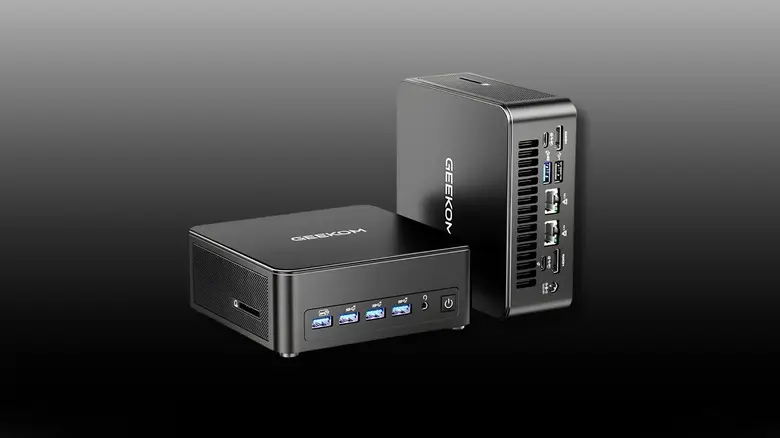
What Is a Mini PC?
A mini PC is a fully working desktop computer in a very small case — usually small enough to hold in one hand or mount behind a monitor. Despite the size, it includes a real processor, memory, storage, Wi-Fi, and the ports you need for daily use.
People buy mini PCs for a few common reasons:
- Saving desk space — it disappears behind a monitor or under a desk.
- A quieter, tidier setup — one small box instead of a bulky tower.
- Low power use — most draw far less electricity than a full desktop.
- Specific jobs — home office work, a media center connected to a TV, or a compact gaming rig.
The trade-off is simple: the smaller the box, the less room there is for cooling and full-size components. That is why choosing the right model for your needs matters more with mini PCs than with regular desktops.
Best Mini PCs of 2026 at a Glance
| Mini PC | Processor / Graphics | RAM | Approx. Price | Best For |
|---|---|---|---|---|
| Minisforum AtomMan G1 Pro | Ryzen 9 8945HX / RTX 5060 | 32GB DDR5 | $1,495 / £1,359 | Best overall |
| ASUS ROG NUC (2025) | Core Ultra 9 / RTX 5070 | 32GB DDR5 | $2,500 / £2,709 | Best pure gaming |
| Minisforum Venus UM790 Pro | Ryzen 9 7940HS / Radeon 780M | 32GB DDR5 | $871 / £779 | Best budget |
| Geekom A9 Max | Ryzen AI 9 HX 370 / Radeon 890M | 32GB DDR5 | $1,589 / £1,439 | Best all-rounder |
| Blackview MP200 | Intel Core i5 / Intel UHD | 16GB DDR4 | Under $500 / £450 | Cheapest usable option |
Prices move around, especially on Amazon — treat these as ballpark figures and check the current price before you buy.
The Best Mini PCs You Can Buy in 2026
Minisforum AtomMan G1 Pro — Best Overall
The AtomMan G1 Pro is the mini PC that proves small computers can be genuinely powerful. It combines an AMD Ryzen 9 8945HX processor with a dedicated NVIDIA RTX 5060 graphics card — the same class of GPU you would find in a mid-range gaming laptop — inside a compact, well-designed chassis.
Why it stands out: It is one of the few mini PCs with real dedicated graphics at a price that does not require a second mortgage. It handles 1080p and 1440p gaming comfortably, chews through video editing and 3D work, and still fits on a bookshelf.
Key specs: Ryzen 9 8945HX (16 cores), RTX 5060 8GB, 32GB DDR5 RAM, 1TB SSD, multiple USB4 and HDMI ports.
Honest limitation: It is louder under full load than a basic office mini PC — that is the price of dedicated graphics in a small box. It is also at the larger end of “mini.”
ASUS ROG NUC (2025) — Best for Pure Gaming
If gaming performance is the priority and budget is secondary, the ASUS ROG NUC is the strongest mini gaming PC you can buy. The top configuration pairs an Intel Core Ultra 9 processor with an RTX 5070 laptop GPU and 32GB of DDR5 memory.
Why it stands out: This is as close as a mini PC gets to a full gaming desktop. It runs AAA titles at 1440p with high settings, supports ray tracing and DLSS, and ASUS’s cooling keeps it stable during long sessions.
Key specs: Intel Core Ultra 9 (Series 2), RTX 5070 8GB, 32GB DDR5, up to 2TB SSD, Thunderbolt 4, Wi-Fi 7.
Honest limitation: At around $2,500 / £2,709, it costs as much as a very good full-size gaming PC — you are paying a premium for the small size. Only worth it if space truly matters to you.
Minisforum Venus UM790 Pro — Best Budget Pick
The UM790 Pro has been the go-to budget recommendation for a while, and it still holds up. Its Ryzen 9 7940HS chip and Radeon 780M integrated graphics deliver excellent everyday performance and genuinely playable light gaming.
Why it stands out: For the price of a mid-range Chromebook, you get a full Windows 11 machine with 32GB of RAM and a 1TB SSD that feels fast in real use — dozens of browser tabs, office apps, streaming, and esports titles at 1080p.
Key specs: Ryzen 9 7940HS, Radeon 780M integrated graphics, 32GB DDR5, 1TB SSD.
Honest limitation: Integrated graphics means demanding AAA games are off the table at high settings. Buy this for work and casual gaming, not as a gaming rig.
Geekom A9 Max — Best All-Rounder
The A9 Max uses AMD’s Ryzen AI 9 HX 370 chip, whose Radeon 890M integrated graphics are the strongest you can get without a dedicated GPU — roughly matching an entry-level graphics card. It also includes an NPU for on-device AI tasks.
Why it stands out: It is the best choice if you want one machine for work, creative apps, and moderate gaming without paying for RTX-level hardware. Build quality and cooling are strong, and it supports up to four displays.
Key specs: Ryzen AI 9 HX 370, Radeon 890M, 32GB DDR5 (expandable to 128GB), dual SSD slots, USB4, Wi-Fi 7.
Honest limitation: At around $1,589, it sits in an awkward middle ground — a stretch over budget picks, yet still short of true RTX gaming performance.
Blackview MP200 — Best Under $500
If you simply need a cheap, working Windows computer for browsing, documents, streaming, and video calls, the Blackview MP200 is hard to beat. It is frequently recommended as the best mini PC under $500 / £500.
Why it stands out: It covers the basics reliably at a price where most alternatives cut corners on RAM or storage. A sensible pick for a kids’ computer, a second PC, or a TV-connected media box.
Key specs: Intel Core i5, Intel UHD graphics, 16GB RAM, 512GB SSD, Windows 11.
Honest limitation: Do not expect gaming beyond very light titles, and 16GB of RAM is the minimum you should accept in 2026 — avoid cheaper 8GB configurations.
Worth Knowing About
- ASUS ROG GR70 — a brand-new ROG gaming mini PC (Ryzen 9 9955HX3D + RTX 5070/5060) shown at CES 2026. Extremely powerful, but availability outside Asia is still limited.
- GMKtec NEO-X1 Pro — pairs a Ryzen 9 9955HX3D with an RTX 5070 and even liquid cooling. Ambitious and interesting, but very new with few independent reviews so far.
- Framework Desktop — the pick for local AI workloads with up to 128GB of unified memory, but overkill (and overpriced) for everyone else.
- AceMagic Retro X5 — a great-looking HX 370 machine if design matters to you, around $999 / £889.
Can You Game on a Mini PC?
Yes — but how well depends entirely on the graphics inside.
Integrated graphics (Radeon 780M / 890M, Intel Arc): Fine for esports and older titles at 1080p — think Valorant, League of Legends, Rocket League, Minecraft, and indie games. You will need low-to-medium settings for newer AAA games, and some simply will not run well.
Dedicated RTX graphics (RTX 5060 / 5070): A different league. These are laptop-class GPUs, but they are real NVIDIA cards with ray tracing and DLSS support. An RTX 5060 mini PC plays modern AAA games comfortably at 1080p and 1440p; an RTX 5070 pushes into high-refresh 1440p territory.
The honest summary: A mini PC with integrated graphics is a work computer that can game a little. A mini PC with RTX graphics is a gaming computer that happens to be small. Decide which one you are buying before you spend the money.
Mini PCs With RTX Graphics: What to Know
RTX mini PCs are the fastest-growing corner of this market, so here is what matters:
- These are laptop GPUs. An “RTX 5070” in a mini PC is the laptop variant — still powerful, but not identical to the desktop card of the same name. Expect roughly 10–15% less performance than the desktop equivalent.
- RTX 5060 is the sweet spot. It handles 1080p ultra and 1440p high settings in modern games, and mini PCs with it start around $1,400–$1,500.
- RTX 5070 costs a lot more. The jump from a 5060 to a 5070 machine is typically $800–$1,000. Worth it for high-refresh 1440p gaming; unnecessary for most people.
- Cooling is everything. A powerful GPU in a tiny box lives or dies by its cooling design. Established gaming brands (ASUS ROG, Minisforum’s AtomMan line) have the track record here — be cautious with unknown brands stuffing RTX cards into small cases.
- DLSS matters more in small PCs. NVIDIA’s DLSS upscaling squeezes extra frames out of limited thermal headroom, which is exactly what a compact machine needs.
How Much Does a Mini PC Cost?
| Budget | What You Get | Example |
|---|---|---|
| Under $500 / £450 | Everyday tasks, streaming, light use | Blackview MP200 |
| $500–$1,000 / £450–£900 | Fast everyday PC, light 1080p gaming | Minisforum UM790 Pro |
| $1,000–$1,800 / £900–£1,600 | Strong all-rounders, RTX 5060 gaming | AtomMan G1 Pro, Geekom A9 Max |
| $2,000+ / £1,800+ | No-compromise RTX 5070 gaming | ASUS ROG NUC |
Two buying tips that save people money: 16GB of RAM is the minimum worth buying in 2026 — skip any 8GB model no matter how cheap. And barebones vs. pre-built matters with some brands: barebones units (no RAM/storage/OS) look cheaper but cost more once you add everything yourself.
Where to Buy a Mini PC in the US and UK
In the US: Amazon carries the widest selection, including Minisforum, Geekom, and Beelink. Best Buy and Newegg stock the mainstream models, and buying direct from the manufacturer (Minisforum, Geekom) sometimes gets you a better price or a newer configuration.
In the UK: Amazon UK is again the easiest option. Currys stocks selected models, and specialist retailers like Scan and Overclockers UK are worth checking for gaming-oriented machines.
Before you buy from a lesser-known brand, check three things: the warranty terms (one year minimum, ideally with local return support), whether Windows is genuinely licensed and pre-installed, and recent buyer reviews — not just the star rating, but what people say after a few months of use.
How to Choose the Right Mini PC
- Start with the graphics question. Gaming or heavy creative work? You need RTX (or at minimum a Radeon 890M). Office work, browsing, and streaming? Integrated graphics are fine and much cheaper.
- Get 16GB of RAM minimum, 32GB if you keep dozens of tabs open or edit photos and video.
- 512GB SSD minimum. 1TB is the comfortable choice — games and creative apps eat storage fast.
- Count your monitors. Check the number and type of video outputs (HDMI, DisplayPort, USB-C) before buying, especially for multi-monitor setups. Pairing your mini PC with the right display matters too — our OLED vs IPS guide explains which panel technology suits your use.
- Check the ports you actually use. USB4/Thunderbolt is valuable for docks and fast external drives; 2.5Gb Ethernet matters if you move large files over a network.
- Think about noise. A mini PC on your desk is closer to your ears than a tower under it. Look for reviewed noise figures rather than marketing claims.
Mini PC vs Desktop vs Laptop
| Mini PC | Desktop Tower | Laptop | |
|---|---|---|---|
| Size | Tiny — fits behind a monitor | Large tower | Portable, all-in-one |
| Performance per dollar | Good | Best | Worst |
| Gaming potential | Up to RTX 5070 | Unlimited | Up to RTX 5090 laptop |
| Upgradability | Limited (RAM/SSD usually) | Excellent | Very limited |
| Power use | Low | High | Low |
| Best for | Tidy desk setups, media centers | Maximum performance, upgrading | Working anywhere |
Frequently Asked Questions
What is a mini PC?
A mini PC is a complete desktop computer built into a very small case — typically small enough to hold in one hand. It runs a full operating system like Windows 11, connects to a regular monitor, keyboard, and mouse, and works like any other desktop, just in far less space.
Can a mini PC run AAA games?
It depends on the graphics. Mini PCs with dedicated RTX graphics (such as the RTX 5060 or 5070) run modern AAA games well at 1080p and 1440p. Mini PCs with only integrated graphics can handle esports titles and older games, but struggle with demanding new releases at high settings.
Are mini PCs good for everyday work?
Yes — this is what most mini PCs are best at. A mid-range mini PC with 16GB of RAM handles browsing, office apps, video calls, and streaming effortlessly, while using less power and desk space than a traditional desktop.
How much RAM does a mini PC need?
16GB is the practical minimum in 2026 for smooth everyday use. Choose 32GB if you multitask heavily, edit photos or video, or do creative work — for example with photo editing software like Photoshop or Lightroom. Avoid 8GB models; they feel slow quickly and cannot be upgraded on many mini PCs.
Can you upgrade a mini PC?
Sometimes. Many mini PCs let you add more RAM (SO-DIMM slots) and storage (M.2 slots), but the processor and graphics are almost always soldered and permanent. Check the specific model’s specs before buying if future upgrades matter to you.
Do mini PCs overheat?
Well-designed ones do not. Compact cases run warmer than towers, but reputable models manage heat with tuned cooling and sensible power limits. Problems mostly appear with no-name brands that pack powerful chips into cases with inadequate cooling — another reason to stick with established names.
Should I buy a mini PC or a laptop?
Buy a mini PC if the computer will mostly stay in one place — you get more performance per dollar and a tidier desk. Buy a laptop if you need to work in different places. If you already own a good monitor, keyboard, and mouse, a mini PC is usually the better value.
Prices and availability change frequently. Check the current price and the seller’s return policy before buying. This guide was last updated in September 2026.