 17 min read
Pokémon GO Friend Codes: How to Add and Find Friends
Pokémon GO is more than catching Pokémon and visiting PokéStops. Its friendship system lets Trainers connect with other players, exchange Gifts, build Friendship levels, participate in certain social activities, and work toward benefits associated with long-term friendships.
One of the easiest ways to connect with another Trainer is through a Pokémon GO Friend Code, officially called a Trainer Code.
Every Trainer has a unique 12-digit Trainer Code and a corresponding QR code that can be used to send a friend request. Niantic currently allows up to 550 friends in its Niantic Friend List, including friends from other Niantic games.
That makes Friend Codes useful when you want to add someone you already know, exchange codes with other players, find international friends for Gifts, or build a friendship network for features such as raids and trading.
This guide explains how Pokémon GO Friend Codes work, how to add someone, how to find your own Trainer Code, how QR codes fit into the system, and what to know about country and Vivillon-based friend searches.
What Is a Pokémon GO Friend Code?
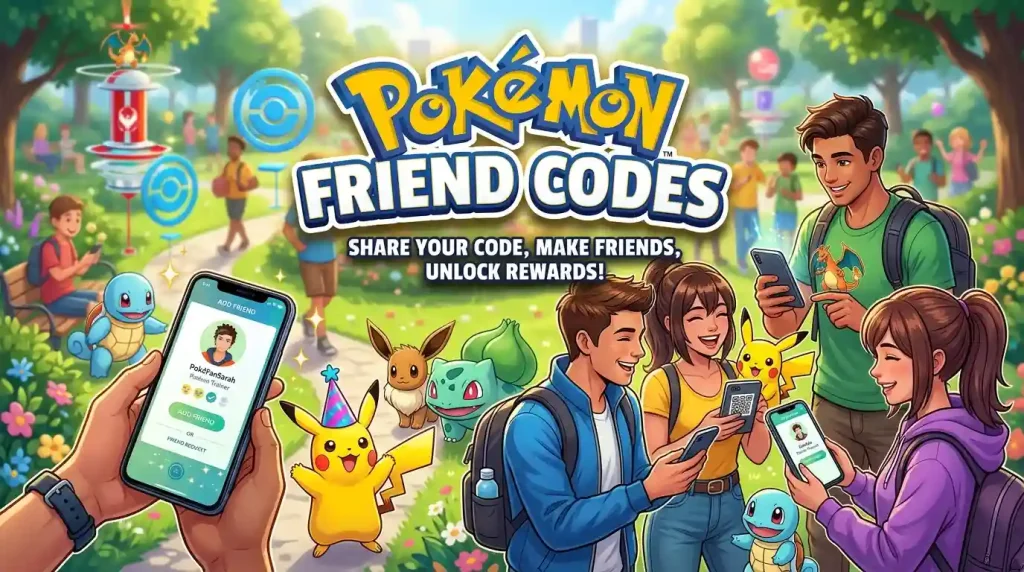
A Pokémon GO Friend Code is the unique 12-digit Trainer Code associated with your Pokémon GO account.
Each Trainer also has a QR code that corresponds to the Trainer Code.
You can give either one to another player.
They can then use the code or scan the QR code to send you a friend request.
The basic process is:
Trainer Code → Friend request → Acceptance → Pokémon GO friendship
The other Trainer does not automatically become your friend simply because they have your code. The friend request must be accepted.
Niantic also states that an unanswered friend request expires after seven days.
Is a Trainer Code the same as a Friend Code?
In everyday Pokémon GO discussions, people commonly say Friend Code, while Niantic’s official terminology is Trainer Code.
So these searches generally refer to the same thing:
- Pokémon GO Friend Code
- Pokémon GO Trainer Code
- Friend Code Pokémon GO
- Friend Code in Pokémon GO
- Pokémon GO friend ID
- Add Trainer Code Pokémon GO
The important number is the unique 12-digit code associated with the Trainer.
How to Add a Friend on Pokémon GO
Adding someone through their Trainer Code is straightforward.
From the map screen:
- Open your Trainer Profile.
- Select the Friends tab.
- Tap Add Friend.
- Enter the other Trainer’s 12-digit Trainer Code.
- Send the friend request.
The other Trainer can then accept or decline the request.
Niantic’s current instructions also allow you to add someone by scanning their QR code instead of manually entering the 12-digit code.
How to add a Pokémon GO friend using a QR code
If the other player gives you their QR code:
- Open your Trainer Profile.
- Open Friends.
- Select Add Friend.
- Open the QR-code option.
- Use your device’s camera to scan the other player’s code.
- Send the friend request.
This can be easier than typing 12 digits, especially when adding someone in person.
How to Find Your Pokémon GO Trainer Code
If you want someone else to add you, you need to give them your Trainer Code or QR code.
To find it:
- Open Pokémon GO.
- Go to your Trainer Profile.
- Tap Friends.
- Select Add Friend.
- Your Trainer Code and QR-code option are available from the friend-add screen.
Your code is associated with your account and can be shared with another player who wants to send you a friend request.
Can you change your Trainer Code?
Niantic’s current help instructions indicate that the Trainer Code can be reset using the reload/reset option associated with the code screen.
If you reset the code, someone using an older version of your code may no longer be able to use it to send a new request.
How to Share Your Pokémon GO Friend Code
There are several ways to share your Trainer Code.
Share the number
You can copy or type your 12-digit Trainer Code into:
- A private message
- A gaming community
- A friend group
- A Pokémon GO discussion
- A social post
- A dedicated friend-code exchange
Share your QR code
A QR code is convenient when another player is physically nearby.
They can scan it instead of manually entering the number.
Use a friend-code exchange
Some Pokémon GO communities allow players to exchange Trainer Codes.
This can help if you want to find:
- International friends
- Gift exchange partners
- Raid partners
- Vivillon postcard sources
- Active players in different regions
However, a public Friend Code is still an account identifier for your Pokémon GO social network, so it is sensible to share it only where you are comfortable receiving requests.
How to Find Pokémon GO Friends
If you do not already know other Pokémon GO players, you have several options.
Find friends you already know
The simplest approach is to ask people you already know for their Trainer Codes.
You can exchange codes directly and start building Friendship.
Find local Pokémon GO players
Local gaming groups can be useful for finding people who regularly play in the same area.
This can be particularly useful for activities that require Trainers to be physically near each other.
Find international Pokémon GO friends
International friend exchanges are popular because Gifts can contain Postcards from different locations.
Those Postcards can also matter for Vivillon collection.
Use dedicated Pokémon GO communities
Some gaming communities maintain areas specifically for Trainer Code exchanges.
If you use one, look for communities that have clear rules against spam, harassment, scams, and inappropriate behavior.
Friend finder Pokémon GO searches
Searches such as:
- Friend finder Pokémon GO
- Find friends on Pokémon GO
- Find new Pokémon GO friends
- Find Pokémon GO friends online
- Find a Pokémon GO friend
all describe essentially the same goal: finding other Trainers to add to your Friend List.
The important thing is to distinguish finding friends from simply collecting random codes.
An active friend who exchanges Gifts or participates in relevant activities can be more useful than a large number of inactive accounts.
Pokémon GO Friend Codes for Raids and Gifts
Friendship can be useful for several parts of Pokémon GO.
One of the most obvious is Gifting.
Once you have connected with another Trainer, you can send and receive Gifts when the relevant requirements are met. Niantic lists Gifts as one of the core features associated with Pokémon GO friendships.
Friends can also become useful for cooperative gameplay and other social features.
Why players exchange codes for raids
Players may exchange Friend Codes because they want to build a larger network of Trainers who can participate in raid-related activities.
However, a Friend Code itself is not a raid invitation code.
That distinction is important.
A Trainer Code identifies your account for friendship requests.
A raid or other group activity can have its own invitation or participation mechanics.
So if someone searches for friend codes for raids Pokémon GO, they are generally looking for Trainers to add so they can build a network for future social play.
Gifts and Pokémon GO Friends
Gifts are one of the main reasons players build Friend Lists.
You can receive Gifts from friends and open them to obtain items and access the attached Postcard.
The Postcard system is particularly relevant to players who collect Vivillon patterns.
Why international friends can be useful
A friend who regularly sends Gifts from another region can provide Postcards that you might not normally encounter through your local gameplay.
That makes international friend exchanges useful for players who are working on regional Vivillon progress.
Pokémon GO Friend Codes by Country
There is no official requirement that Trainer Codes be organized by country.
However, players often search for friend codes by region because they want connections with Trainers from specific parts of the world.
Examples include:
- Pokémon GO friend codes Africa
- Pokémon GO friend codes Ocean
- Pokémon GO Trainer Codes by country
- Pokémon GO friend codes Europe
- Pokémon GO friend codes Asia
- Pokémon GO friend codes North America
- Pokémon GO friend codes South America
The main reason to look for friends by country or region is often Postcard and Vivillon collection, rather than simply increasing the number of friends.
Why country matters for Vivillon
Vivillon has different wing patterns associated with different geographic habitats.
In Pokémon GO, collecting Postcards from different regions contributes to Vivillon Collector Medal progress. When the relevant progress is completed, it can lead to an encounter with Scatterbug that can evolve into a Vivillon associated with that region.
This creates a genuine reason for some players to seek international Pokémon GO friends.
Pokémon GO Friend Codes for Vivillon
If Vivillon is your main reason for finding new friends, don’t focus only on the Trainer’s country.
The important thing is the Postcard attached to the Gift.
A player may live in one place but have Gifts from another location, while another player may regularly visit multiple regions.
The Postcard is what contributes to the relevant Vivillon region progress.
How the Vivillon connection works
The basic process is:
- Add a Pokémon GO friend.
- Receive a Gift from that friend.
- Open the Gift interface.
- View the attached Postcard.
- Save or pin the Postcard when appropriate.
- Build progress toward the corresponding Vivillon region.
- Eventually encounter Scatterbug associated with that region.
Niantic’s current Postcard guidance explains that saving Postcards from different regions contributes to Vivillon Collector progress.
Pokémon GO friend codes Ocean
Searches for Pokémon GO friend codes Ocean often relate to players looking for the Ocean Vivillon pattern.
The same general principle applies to other Vivillon habitats.
Rather than treating a country name as a guarantee of a particular pattern, check the Postcards you actually receive.
Pokémon GO Friends QR Code
A QR code is simply another way to exchange a Trainer Code.
Every Trainer has a corresponding QR code, according to Niantic’s current friend-adding documentation.
QR codes are particularly convenient when:
- You are adding someone in person.
- You do not want to type 12 digits.
- A group is exchanging codes.
- You are helping another player add you.
QR code vs Trainer Code
They ultimately serve the same basic friend-request purpose.
Trainer Code:
- 12-digit number
- Entered manually
QR Code:
- Scanned using the device camera
- Avoids manual number entry
Neither one is a separate type of Pokémon GO friendship.
Friend Codes vs Referral Codes vs Battle Codes
Several different Pokémon GO codes can be confused with one another.
They do different jobs.
Trainer Code / Friend Code
Used to send a friend request.
This is the code most people mean when they search for Pokémon GO Friend Codes.
Referral Code
Used to refer eligible new or returning Trainers to Pokémon GO.
Niantic says referral codes can provide milestone rewards to both the referring player and the referred player. Referral eligibility has specific requirements, including rules concerning new or recently inactive Trainers.
A referral code is therefore not the same as a Trainer Code.
Battle-related codes
A Trainer Code should also not be confused with a code used for a specific battle or group activity.
The purpose of the Trainer Code is to identify a player for adding them to your Friend List.
How Many Friends Can You Have in Pokémon GO?
This is an area where older Pokémon GO guides can become outdated.
Niantic’s current Help Center says you can have up to 550 friends in your Niantic Friend List, including friends from other Niantic applications.
If you reach the limit, you need to remove existing friends before adding additional ones.
Why older guides may show a different number
Pokémon GO’s friend limits have changed over time.
Therefore, if you find an older guide claiming a smaller limit, check the current Niantic documentation before relying on that number.
For a 2026 article, the current documented limit is the more relevant figure.
How to Remove or Manage Pokémon GO Friends
You can manage your Friend List directly from your Trainer Profile.
To remove someone, open the relevant friend profile and use the available friend-management options.
There is an additional detail worth knowing: Niantic’s current profile documentation says that removing a friend through the Niantic Profile can remove that connection across Niantic games.
So if you use multiple Niantic games, pay attention to which friend-management interface you are using.
Why remove inactive friends?
Some players maintain a large Friend List and periodically remove accounts that:
- Never interact
- No longer play
- Stop opening Gifts
- No longer participate in activities
- Were added only for a temporary purpose
This can make room for more active connections.
Can You Find Friends From Your Phone Contacts?
Pokémon GO can use device contact access to help identify people who may already be playing Niantic games.
However, this is different from publicly searching for Trainer Codes.
Contact-based discovery depends on the permissions you grant and the information associated with the relevant accounts.
If you do not want the game to access your contacts, review the permission settings on your device before enabling contact-based features.
Pokémon GO Friend Codes 2026
For Pokémon GO Friend Codes 2026, the basic system remains centered around the Trainer Code.
The current documented process is:
Trainer Profile → Friends → Add Friend → Trainer Code or QR Code
The current Niantic documentation identifies the Trainer Code as a unique 12-digit code and the associated QR code as another way to send friend requests.
The current Friend List limit is 550 across the Niantic Friend List, including friends from other Niantic games.
Because Pokémon GO continues to receive updates, specific menus, limits, and social features can change.
For that reason, a friend-code guide should explain the system rather than promise that a particular third-party exchange page or code list will remain current.
Should You Publish Your Pokémon GO Friend Code Online?
You can share your Trainer Code publicly, but think about what you want to get from doing so.
A public code can result in:
- More friend requests
- More Gift exchanges
- More international connections
- More potential raid connections
- More Vivillon-related Postcards
It can also result in:
- Requests from people you do not know
- Inactive friends
- Unwanted messages or interactions
- A Friend List that fills quickly
There is no requirement to publish your code publicly.
If you only want a few reliable friends, exchanging codes privately may be more appropriate.
Is It Safe to Exchange Pokémon GO Friend Codes?
A Trainer Code is specifically designed to help players connect, so sharing it is a normal part of Pokémon GO’s social system.
Still, you should use reasonable caution when exchanging codes with strangers.
Avoid sharing information that is unrelated to the game, such as:
- Passwords
- Login credentials
- Payment information
- Personal identification documents
- Private addresses
- Other account-security information
A Friend Code is for adding a Trainer. It is not a password and should never be treated as one.
Extra caution for younger players
Parents and guardians can also control access to social features on eligible child accounts.
Niantic says social features such as Friends, Gifting, Trading, and Trainer Battles can require parental approval for child accounts using Niantic Kids or Pokémon Trainer Club.
That provides an additional layer of account-level control.
Why Build a Pokémon GO Friend List?
The value of friends depends on how you play.
For Gifts
Friends give you more opportunities to exchange Gifts and collect Postcards.
For Vivillon
International connections can help you collect Postcards associated with different Vivillon habitats.
For raids
A larger network can make it easier to coordinate with other Trainers for activities that involve multiple players.
For Friendship progression
Interacting with friends can increase Friendship levels and unlock associated benefits.
For trading
Friends are part of Pokémon GO’s trading system, although trading has its own requirements and is not simply something that can be completed remotely through a Friend Code.
Niantic’s current help center treats Friends, Gifting, Trading, and Friendship progression as connected parts of the game’s social system.
What Makes a Useful Friend-Code Exchange?
If you are looking for new Pokémon GO friends, quantity is not necessarily the only goal.
A useful exchange can specify what the player is looking for.
For example:
Looking for:
International friends for Gifts and Vivillon Postcards.
Or:
Looking for:
Active players for Gift exchanges and raid coordination.
Or:
Looking for:
Trainers from specific regions for Postcard collection.
This gives other players a reason to add you and makes the resulting Friend List more useful.
Why You Should Not Trust Every Friend-Code List
Friend Codes are user-generated.
That means a published list can become outdated when:
- A player reaches the Friend List limit.
- A Trainer stops playing.
- Someone resets their Trainer Code.
- A player no longer wants new requests.
- A code is copied incorrectly.
- A list has not been updated.
For this reason, a website should not claim that every code in a large public list is currently active unless the site actually maintains and verifies the submissions.
A smaller, moderated exchange system can be more useful than a huge static list of unverified codes.
Final Thoughts on Pokémon GO Friend Codes
Pokémon GO Friend Codes are simply a convenient way to connect one Trainer with another.
Every Trainer has a unique 12-digit Trainer Code and corresponding QR code. You can use either to send a friend request, and the other player can accept or decline it. Niantic currently documents a maximum of 550 friends in the Niantic Friend List, including friends from other Niantic games.
Finding friends can be useful for several reasons.
Some players mainly want Gifts. Others are interested in international Postcards and Vivillon patterns. Some want to build a larger network for raids or other social activities.
The reason for adding someone matters more than simply collecting hundreds of codes.
If you want international friends, country and region can be useful search criteria, but Vivillon progress ultimately depends on the Postcards you collect rather than simply the country listed by another player.
And if you are publishing or exchanging Friend Codes online, remember that codes are user-generated and can become inactive. A properly maintained exchange is more reliable than a static list claiming that every code is guaranteed to work.
For most players, the basic process is all you need:
Find a Trainer → exchange Trainer Codes or QR codes → send a friend request → become friends → interact through Gifts and other available friendship features.
If you enjoy mobile gaming beyond Pokémon GO, check out our guide to the best offline mobile games for Android and iOS you can play without a connection.
Where to Find Active Pokémon GO Friend Codes Today
A Pokémon GO friend code is simply another player’s Trainer Code, so there is no single master list of codes that works for everyone. The codes you can actually use come from real players who are actively sharing theirs.
The most reliable places to find active codes are where players gather: Pokémon GO community groups, the game’s subreddit, Discord communities dedicated to friend-code exchange, and friends of friends in your local community. Codes shared in active communities are far more likely to be accepted quickly than codes copied from old, static lists, which often belong to players who no longer play.
When you add a code, send or open a gift promptly — most players remove friends who stay inactive. And only ever share your Trainer Code itself: it is safe to share publicly, and you never need to give out your login details, email or password to exchange friend codes.
FAQs
Can I have more than one Pokémon GO Friend Code?
Your Trainer account has a unique Trainer Code, rather than a collection of separate Friend Codes. Niantic also provides a corresponding QR code for the same friend-adding process.
Does someone get notified when I send a Pokémon GO friend request?
The recipient can see the friend request through their Friend List and can accept or reject it. If the request receives no response, Niantic says it expires after seven days.
Can I remove a Pokémon GO friend and add them again later?
You can remove friends and send another friend request later if you still have a valid way to contact or identify that Trainer. However, removing and re-adding someone can affect the existing friendship relationship, so it should not be treated as a way to preserve your previous Friend List status.
Do I need someone’s Trainer Code to add them?
No. Pokémon GO also supports adding Trainers through QR codes and other supported friend-discovery methods. The Trainer Code is simply the most recognizable method for exchanging friend information directly.