 20 min read
DeepFaceLive: Installation, Models, OBS, Hardware & Setup Guide
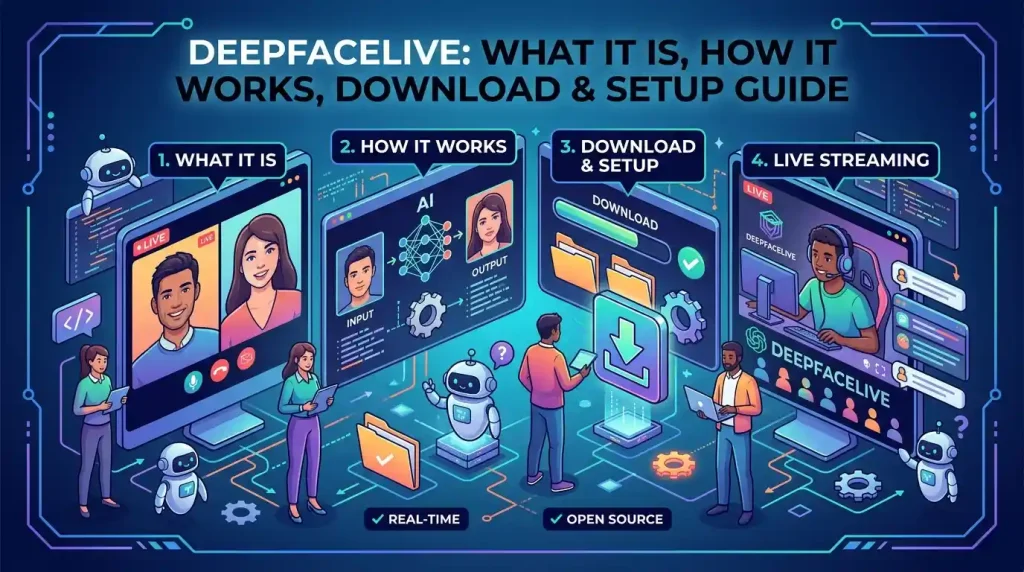
DeepFaceLive is a real-time face-swapping application designed for use with a PC camera or video source. Its original project was built around real-time face replacement for streaming and video calls, with components for face detection, face alignment, face swapping, face animation, frame adjustment, and output.
The software became popular because it could process a camera feed and display a modified video stream in real time rather than requiring the user to render a finished video first.
However, there is an important detail anyone searching for DeepFaceLive in 2026 needs to know:
The original iperov/DeepFaceLive GitHub repository was archived by its owner on November 13, 2024. It is now read-only.
That means many older tutorials still describe the original project as if it were actively developed. They also often point users toward old release mirrors, EXE files, BAT launchers, and third-party model downloads.
Those instructions should be treated carefully.
There are newer forks and modified repositories, but a fork is not automatically the same thing as the original project.
This guide explains what DeepFaceLive does, how its workflow operates, what the original source repository contains, how Windows installation works at a high level, how models fit into the application, how OBS can be used for output, what an RTX 3080 means for the workload, and what to check before downloading a current build.
AI software can cover everything from real-time video tools to everyday productivity features. If you use ChatGPT regularly, see our guide to ChatGPT archived chats to learn how to find and manage archived conversations.
What Is DeepFaceLive?
DeepFaceLive is software for real-time face swapping and face animation.
The original project describes its main purpose as real-time face swapping for PC streaming or video calls. It can process a webcam feed or video source and apply a trained face model to the detected face.
At a high level, the application takes a video frame, finds the face, determines its position and orientation, processes the face through the selected model, and combines the result back into the frame.
The original application includes several processing components, including:
- Face detection
- Face alignment
- Face marking
- Face swapping
- Face animation
- Frame adjustment
- Face merging
- Stream output
The source code shows these components connected together as part of the application’s processing pipeline.
That architecture is what allows DeepFaceLive to operate on a live camera stream rather than only producing an exported video.
DeepFaceLive, DeepFace Live, and “Deepfake Live”
You may encounter several different spellings while researching the software:
- DeepFaceLive
- DeepFace Live
- Deepface live
- Deep fake live
- Deepfake live
- Deep Face Live app
Most of these searches are referring to the same general software concept: real-time AI-assisted face replacement.
However, “deepfake live” is also a generic description, not necessarily the name of a specific application.
That distinction matters because searching for the generic term can return unrelated software, browser services, mobile applications, websites, forks, tutorials, and other face-swapping projects.
If you are specifically looking for the original open-source project, the important identifier is the original GitHub repository associated with iperov/DeepFaceLive.
How Does Real-Time Face Swapping Work?
DeepFaceLive’s processing can be understood as a pipeline.
1. Video input
The application receives a frame from a camera or another supported video source.
2. Face detection
The software identifies where a face appears in the frame.
3. Face alignment
The detected face is analyzed so the system can understand its position, orientation, and relevant facial structure.
4. Face model processing
A selected model is used to generate the replacement face.
5. Face merging
The generated face is combined with the original frame.
6. Output
The resulting frame is displayed in the application’s output window or passed into another workflow.
The process has to happen quickly enough to maintain a usable live stream.
That is why GPU capability, model complexity, resolution, camera quality, and processing settings all affect the experience.
DeepFaceLive in 2026: What Is the Current Project Status?
This is the most important update for anyone following an old tutorial.
The original iperov/DeepFaceLive GitHub repository is archived.
GitHub currently identifies the repository as archived on November 13, 2024, meaning the repository is read-only and is no longer being developed there as an active upstream project.
The original repository remains useful as a reference because it contains:
- Source code
- Documentation
- Windows setup instructions
- Model infrastructure
- Historical releases
- User documentation
- FAQ material
But an archived repository should not be treated as though it represents an actively maintained 2026 Windows application.
What about newer DeepFaceLive forks?
There are multiple repositories using the DeepFaceLive name.
For example, filliptm/DeepFaceLive currently contains a modified project with updated setup documentation and a small number of commits. Its documentation describes a newer Python-based setup, CUDA requirements, and updated dependencies.
That does not automatically make it the official continuation of the original project.
When evaluating a fork, check:
- Who maintains it
- Commit history
- Release history
- Documentation
- Dependency versions
- Issues and pull requests
- Whether the maintainer explains its relationship to the original project
- Where downloadable binaries are hosted
- Whether the project has been recently updated
This is particularly important with software that processes cameras, video, and downloaded model files.
Where Is the DeepFaceLive GitHub Repository?
The original source code is hosted on GitHub under the iperov/DeepFaceLive repository.
It contains the original application’s source code and documentation, including Windows setup instructions and model-related code.
The repository is useful for understanding how the software works and for checking what the original project actually documented.
However, because it is archived, it should not be confused with a current actively maintained release channel.
Why the GitHub distinction matters
A search for “DeepFaceLive GitHub” can return many repositories.
Some are:
- Forks
- Copies
- Modified versions
- Personal experiments
- Reuploads
- Unrelated projects using the same name
A repository appearing on GitHub does not automatically mean it is the original project.
Look at the repository owner, history, documentation, and relationship to the original source before installing anything.
DeepFaceLive Download: What Should You Look For?
There is no reason to download the first DeepFaceLive.exe, ZIP, or BAT file you find through a search engine.
This is especially important because the original project is archived and its old Windows release instructions referenced external hosting services.
The original documentation described standalone Windows builds and a portable installation process, but those instructions belong to an older project state.
A safer download approach
When evaluating a current build:
- Identify the repository you are actually downloading from.
- Check the repository owner.
- Read the README.
- Check the latest commit date.
- Check the release history.
- Look for installation documentation.
- Review the required dependencies.
- Avoid random executable mirrors.
- Avoid repackaged model bundles from unknown sources.
- Scan downloaded files before running them.
A “DeepFaceLive download free” search can easily lead to sites that package old software with unrelated installers.
Free software does not mean every download source is trustworthy.
Real-time face-swapping can involve both video processing and image manipulation. If you are interested in broader tools for working with images, see our guide to photo editing software and the different options available for editing and enhancing photos.
Why EXE and BAT Files Need Extra Attention
Older DeepFaceLive Windows instructions used a portable build and a DeepFaceLive.bat launcher.
The original Windows documentation specifically describes unpacking a Windows build and running the DeepFaceLive.bat file.
The original build scripts also show that the project generated different Windows builds for NVIDIA CUDA and DirectX/DirectML backends.
That explains why old tutorials often tell users to look for files such as:
DeepFaceLive.exeDeepFaceLive.bat- Windows build folders
But these filenames alone do not establish that a download is authentic.
A BAT file can execute commands on your computer, and an EXE can contain arbitrary executable code.
Always establish the source before running either.
How To Install DeepFaceLive on Windows
The original DeepFaceLive project was primarily documented around Windows.
Its original system requirements specified Windows 10 and a DirectX 12-compatible graphics card, with the project recommending hardware such as an RTX 2070 or Radeon RX 5700 XT and above. It also listed a modern CPU with AVX, 4 GB RAM, and a 32 GB or larger paging file.
However, these are historical requirements for the archived project, not a guarantee that every current fork has identical requirements.
For an original-style Windows build
The basic workflow documented by the original project was:
- Install current graphics drivers.
- Ensure Windows has sufficient virtual memory.
- Obtain the appropriate Windows build from a trusted project source.
- Extract the application.
- Launch the provided DeepFaceLive launcher.
- Select a video file or camera source.
- Configure face detection.
- Configure face alignment/marking.
- Select a face-swap model.
- Choose the appropriate processing devices.
- Check the merged output.
The original setup documentation describes this sequence directly.
Current forks can be different
A current fork may require Python, specific CUDA libraries, ONNX Runtime packages, Visual C++ components, or other dependencies.
For example, the currently visible filliptm fork’s setup documentation specifies Python 3.8+, NVIDIA CUDA support for GPU acceleration, CUDA 12.x, cuDNN 9.x, Visual C++ Redistributable on Windows, and optional FFmpeg.
That is why you should follow the instructions for the specific repository version you are installing, rather than combining an old tutorial with a newer fork.
How To Use DeepFaceLive After Installation
Once the application is running, the workflow is conceptually straightforward.
Select an input
The original application supports a camera source and video-file input.
For a camera workflow, select the appropriate camera device.
For testing, a prerecorded video can be easier because you can repeat the same input while changing settings.
Configure face detection
The face detector identifies the face that should be processed.
Detection quality affects everything downstream.
If the application struggles to locate the face, the final result can become unstable even if the selected model is good.
Configure face alignment and marking
The software uses facial landmarks and alignment information to determine how the replacement should be positioned.
This becomes particularly important when the person turns their head or changes expression.
Select a model
Choose a compatible face model.
The model determines what replacement face the application generates.
Configure processing devices
Depending on the build, different components may use CUDA, DirectML, CPU, or other supported processing backends.
Check the output
The final preview lets you evaluate:
- Face alignment
- Mask boundaries
- Lighting
- Resolution
- Tracking stability
- Processing delay
Make adjustments gradually rather than changing every setting at once.
What Are DeepFaceLive Models?
DeepFaceLive models are trained files used by the face-swapping system.
The original project uses DFM models for its main face-swap workflow.
The model infrastructure in the source code identifies available DFM models and can download supported models from the project’s GitHub release infrastructure.
The original repository included numerous example models.
The important concept is that the application itself is the processing framework, while the model provides the learned face representation used for the replacement.
Why model quality matters
A powerful GPU does not automatically produce a perfect face swap.
The final appearance can also depend on:
- Model quality
- Model resolution
- Face angle
- Lighting
- Camera quality
- Facial expression
- Occlusion
- Source and target similarity
- Processing settings
A model trained or prepared for one type of face may perform poorly in difficult conditions.
Can You Use Custom Models?
The original project supports DFM model files and documents workflows involving custom face models.
Its documentation also connects DeepFaceLive with DeepFaceLab for users who want to train their own models.
However, creating a custom model is a much more involved process than simply downloading the application.
It involves preparing suitable training data, training the model, evaluating the result, and exporting it into a format DeepFaceLive can use.
For a basic first setup, it makes more sense to understand the application using a legitimate compatible model before attempting a custom training workflow.
DeepFaceLive and OBS
OBS Studio can act as the bridge between DeepFaceLive’s output and other applications.
The original DeepFaceLive video-call documentation describes a workflow where:
- DeepFaceLive generates the replaced-face output.
- OBS captures the DeepFaceLive output window.
- OBS starts its virtual camera.
- A video-call application selects OBS Virtual Camera as its camera input.
The original documentation also describes a separate audio-routing setup when synchronized audio is required.
This makes OBS useful because the video-call application does not necessarily need to understand DeepFaceLive directly.
Instead:
Camera → DeepFaceLive → OBS → Virtual Camera → Video application
OBS workflow
For a basic video-output workflow:
- Start DeepFaceLive.
- Configure your permitted camera or test video source.
- Confirm the swapped output.
- Open OBS.
- Add a Window Capture source.
- Select the DeepFaceLive output window.
- Start the OBS Virtual Camera.
- In the receiving application, select OBS Virtual Camera.
This follows the architecture documented by the original project.
Use this only where face replacement is permitted and disclosed appropriately.
Can DeepFaceLive Be Used for Video Calls?
Yes, that was one of the original project’s documented use cases.
The original project specifically described DeepFaceLive as real-time face-swap software for PC streaming or video calls.
The documented video-call workflow uses a virtual-camera layer so the calling application receives the processed video rather than the original camera feed.
But there is an important practical distinction:
Technical capability does not determine whether a particular use is appropriate.
Using a face swap for a clearly disclosed demonstration, creative performance, testing, or entertainment is very different from secretly presenting yourself as another real person.
Never use face-swapping technology to deceive people about your identity, bypass identity verification, impersonate another person, or facilitate fraud.
Will DeepFaceLive Work Well With an RTX 3080?
An RTX 3080 is within the class of hardware that makes sense for this type of workload.
The original DeepFaceLive documentation recommended an RTX 2070 or better for its Windows setup.
An RTX 3080 is therefore above that historical recommended GPU tier.
However, that does not mean you should expect a guaranteed FPS, latency, or visual quality.
Performance depends on the complete configuration, including:
- DeepFaceLive version or fork
- GPU drivers
- CUDA/DirectML configuration
- Model
- Resolution
- Face detector
- Face marker
- Face merger
- Input resolution
- Output resolution
- Camera frame rate
- CPU
- RAM
- Background applications
- Processing settings
The original project also documented different processing backends, including CUDA and DirectX/DirectML builds.
RTX 3080 practical expectation
The sensible conclusion is:
An RTX 3080 is suitable hardware to investigate DeepFaceLive, but it does not guarantee a particular real-time performance level.
If you’re troubleshooting performance, monitor GPU utilization, VRAM usage, frame rate, and processing delay while changing one setting at a time.
Does DeepFaceLive Work on Mac?
The original DeepFaceLive project was primarily documented around Windows for its ready-to-use desktop release.
Its main system requirements explicitly referenced Windows 10, and the documented Windows release was provided as a Windows x64 build.
The repository also contained Linux build documentation, but that does not mean there was an equivalent polished consumer installation experience for every Linux configuration.
You should therefore not assume that a Mac can simply install the same DeepFaceLive package used on Windows.
Current forks may have different experiments or compatibility work, but those should be evaluated individually.
Does DeepFaceLive Work on Mobile?
The original project documentation includes material about using an Android phone camera as a camera source.
That is different from saying that DeepFaceLive itself is a normal Android or iOS mobile app.
The core application was designed as desktop software.
Therefore:
DeepFaceLive for Windows: documented and historically supported.
Android camera as an input: documented in the original project.
DeepFaceLive as a standard Android app: do not assume.
DeepFaceLive as an iPhone app: do not assume.
A search for “DeepFaceLive app” can therefore be misleading because third-party mobile applications may use similar terminology without being the original desktop project.
Does DeepFaceLive Work in a Web Browser?
The original DeepFaceLive project is desktop software, not a conventional browser-based web application.
A website advertising “DeepFaceLive web” may be:
- A third-party service
- A hosted face-swapping platform
- A wrapper around another technology
- An unrelated project using similar terminology
Do not assume that a web service is the original DeepFaceLive software.
If a browser service asks you to upload sensitive face images or identification documents, review its privacy practices carefully before doing so.
Common DeepFaceLive Problems
The GPU is not detected
Check:
- GPU drivers
- CUDA installation
- Compatible runtime packages
- Correct application build
- Whether the selected backend matches your hardware
The original project supported different backends, while newer forks can require different CUDA and runtime versions.
CUDA errors appear
CUDA errors can result from mismatched drivers, CUDA libraries, ONNX Runtime versions, or unsupported configurations.
Don’t blindly install random DLL files from download sites.
Instead, compare your environment against the exact requirements of the project version you’re using.
The model will not load
Check:
- File extension
- Model compatibility
- Model location
- File integrity
- Application version
- Processing backend
The original application expects compatible DFM model files for its DFM face-swap component.
The face looks poorly aligned
Possible causes include:
- Poor lighting
- Extreme head angle
- Occlusion
- Low camera resolution
- Incompatible model
- Incorrect settings
- Weak face detection
Changing the model does not necessarily solve every alignment problem.
The output is delayed
Real-time face swapping requires processing every frame.
The original video-call documentation specifically notes that processing introduces delay in the output window.
Reducing unnecessary processing load and using appropriate output settings can help, but latency varies by hardware and configuration.
The application crashes after an update
This is especially relevant with older projects.
An old DeepFaceLive build may depend on older Python, CUDA, ONNX Runtime, or other libraries.
If you install a newer fork, do not automatically combine its dependencies with an old tutorial.
Follow the dependency versions documented for that specific fork.
Why Old DeepFaceLive Tutorials Can Be Misleading
Many DeepFaceLive tutorials online were written when the original repository was actively maintained.
They may therefore refer to:
- Older Windows builds
- Older CUDA versions
- Older Python versions
- Old model URLs
- External download mirrors
- Previous interface layouts
- Outdated GPU recommendations
The original repository is now archived, so a tutorial from several years ago should be treated as historical documentation rather than automatically valid 2026 installation guidance.
This is one of the biggest reasons people searching for DeepFaceLive download can end up with confusing or incompatible instructions.
How to Evaluate a DeepFaceLive Fork
If you find a newer GitHub repository claiming to be an updated DeepFaceLive version, investigate it before installing.
Check the repository owner
Compare the owner with the original project.
A different owner means you’re looking at a fork or separate implementation unless the relationship is clearly documented.
Check recent commits
A repository with current activity may be more useful than an abandoned copy, but activity alone does not guarantee quality.
Check releases
Look for:
- Version information
- Release notes
- Checksums where available
- Build instructions
- Known issues
Check dependencies
Be especially careful with:
- Python
- CUDA
- cuDNN
- ONNX Runtime
- DirectML
- Visual C++
- FFmpeg
Check model sources
A model file can be just as important as the application itself.
Don’t download model files from random file-hosting websites simply because a forum post says they work.
DeepFaceLive and Privacy
Face-swapping software processes biometric-looking visual information.
Even when you are using your own face, the camera feed can contain other people, background information, voices, documents, screens, or other sensitive material.
Think about:
- Where the video is processed
- Whether anything is uploaded
- Which models you download
- What permissions the software has
- Where output files are saved
- Who can access recorded video
A local application and an online face-swapping service can have very different privacy implications.
Responsible Use of Face-Swapping Technology
DeepFaceLive can be used for legitimate creative and technical purposes, but the same technology can also be abused.
Responsible use means:
Use your own face or obtain permission
If another person’s likeness is involved, get appropriate permission before creating or distributing face-swapped material.
Disclose synthetic media when appropriate
People viewing a manipulated video should not be deliberately misled about whether the face is authentic.
Don’t impersonate people
Do not use face swapping to pretend to be another person in a way that could deceive, harm, or defraud someone.
Don’t bypass identity verification
Face-swapping software should never be used to defeat biometric checks, account verification, KYC procedures, or security systems.
Protect source material
Don’t collect or distribute someone’s facial images simply because the technology makes it technically possible.
Consider platform rules
Streaming and communication services can have their own policies concerning manipulated media, impersonation, and deceptive content.
Is DeepFaceLive Still Worth Looking At in 2026?
That depends on what you’re trying to accomplish.
The original project remains technically interesting and its source code and documentation provide useful insight into real-time face-swapping pipelines.
But its archived status matters.
If you need an actively maintained application, you should evaluate current forks or alternative projects based on their recent development, compatibility, security, and documentation rather than assuming the original 2021–2023 tutorials represent the current state.
For someone studying the technology, the original repository is still valuable.
For someone installing it on a current machine, version compatibility and source verification should be the first priorities.
DeepFaceLive at a Glance
| Question | Practical answer |
|---|---|
| What is DeepFaceLive? | Desktop software for real-time face swapping and face animation |
| Main original platform | Windows |
| Original GitHub | iperov/DeepFaceLive |
| Original repository status | Archived/read-only since November 13, 2024 |
| Real-time camera input | Yes |
| Video input | Yes |
| Face models | DFM models and other supported model workflows |
| OBS workflow | Yes, documented through window capture and virtual camera |
| Video-call workflow | Yes, historically documented |
| RTX 3080 | Suitable class of GPU; no guaranteed FPS |
| Mac | Don’t assume original Windows build compatibility |
| Android/iPhone app | Not the same as the desktop application |
| Browser version | Not the original desktop application |
| Current forks | Exist, but must be evaluated separately |
| Random EXE/ZIP downloads | Avoid |
| Random model downloads | Avoid |
| Identity deception | Not appropriate |
Final Takeaway
DeepFaceLive is a notable open-source real-time face-swapping project that was designed to process webcam or video input and produce a modified live output for creative work, streaming, and video-call workflows.
Its original architecture includes face detection, alignment, model-based face swapping, face animation, merging, and stream output.
But the most important thing to understand in 2026 is its project status.
The original iperov/DeepFaceLive repository was archived in November 2024. It remains useful as source code and historical documentation, but it should not be confused with an actively maintained official release.
Newer forks exist, and some have updated installation instructions and dependencies. Those forks should be evaluated as separate projects rather than automatically treated as official updates.
For Windows users, the original project documented a Windows workflow involving a compatible GPU, camera or video input, face detection, a compatible model, and output configuration. OBS can then be used to capture the processed window and expose it as a virtual camera.
An RTX 3080 is comfortably within the hardware class historically recommended for the original project, but real-world performance depends on the complete software and hardware configuration rather than the GPU name alone.
Most importantly, download the software and models only from sources you can verify, treat forks as separate projects, and use face-swapping technology transparently and with appropriate consent.
What Readers Want to Know
Is DeepFaceLive still actively developed?
The original iperov/DeepFaceLive repository is not actively maintained there. GitHub shows that it was archived by the owner on November 13, 2024. Newer repositories and forks exist, but their maintenance status must be evaluated independently.
Can DeepFaceLive replace a face from a webcam in real time?
Yes. The original project was specifically designed to process webcam or video input for real-time face swapping. The resulting output can then be used in a streaming or video-call workflow through appropriate capture and virtual-camera tools.
Why does my DeepFaceLive model look different from the examples?
Model quality is only one factor. Lighting, camera resolution, face angle, expressions, occlusion, alignment, processing settings, and the model itself can all affect the final result.
Should I download an old DeepFaceLive EXE from a third-party website?
It is safer not to rely on an unverified executable mirror. The original project’s archived documentation referenced external release hosting, but current users should verify the repository, release provenance, files, and dependencies before running any executable, especially because many third-party sites now use the DeepFaceLive name.