 18 min read
Image Retention vs Burn-In: What’s the Difference and Can You Fix It?
Seeing a faint logo, game HUD, taskbar, navigation bar, or other shape after changing what is displayed on your screen can be alarming. It is easy to assume that the panel is permanently damaged, but a visible afterimage does not automatically mean burn-in.
The important distinction is between temporary image retention and persistent image wear. Image retention can fade after the display changes content or rests, while burn-in refers to a more persistent unevenness caused by differences in how pixels have aged.
The distinction becomes particularly important with OLED displays, where each pixel produces its own light. However, the exact behavior varies between display technologies, panels, and manufacturers.
This guide explains how image retention and burn-in differ, how to test for the problem, how long temporary retention may last, what you can safely try, and what to consider on OLED TVs, gaming displays, laptops, and iPhones.
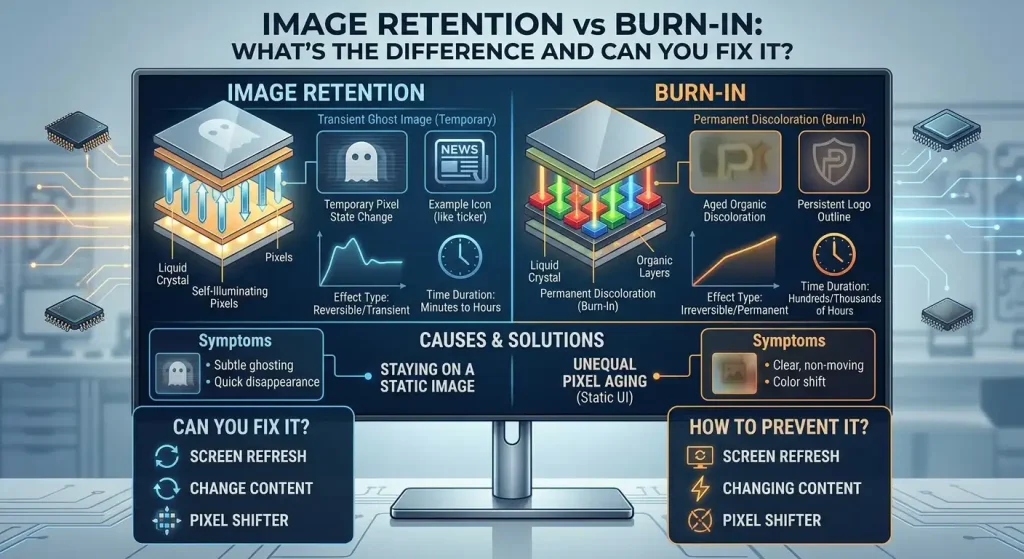
Image Retention vs Burn-In: The Quick Difference
The easiest starting point is to look at how the visible image behaves over time.
| Factor | Image Retention | Burn-In |
|---|---|---|
| Typical behavior | Temporary afterimage or ghosting | Persistent image pattern or unevenness |
| Visibility | May become less noticeable after content changes | Can remain visible across different content |
| Can it fade? | Often, depending on the panel and situation | Persistent wear generally does not simply disappear through normal use |
| Common association | Static content displayed for a period of time | Uneven pixel aging after prolonged or repeated exposure |
| What to try | Change content, allow the display to rest, use appropriate panel-care features | Check manufacturer support and warranty options if persistent |
| Diagnosis | Observation over time can provide clues | Persistent symptoms may indicate panel wear |
The terms are sometimes used inconsistently. Some manufacturers use “image retention” broadly, while others distinguish temporary persistence from permanent burn-in more explicitly.
Apple, for example, describes image persistence on its OLED iPhone displays as temporary and distinguishes it from burn-in that can occur under more extreme long-term conditions.
So the practical question is not simply “Can I see a ghost image?”
The better question is:
Does the image fade as the display changes content and rests, or does the same pattern remain consistently visible?
What Is Image Retention?
Image retention is a visible trace of previously displayed content that remains on the screen after the content has changed.
Imagine playing a game for several hours. The game has a bright health bar, minimap, or scoreboard that stays in the same position. You exit the game and open a completely different screen, but you can still faintly see the shape where that HUD element was.
That can be image retention.
The same thing can happen with:
- Static logos
- Windows taskbars
- Navigation bars
- Application interfaces
- Menus
- Browser elements
- Scoreboards
- News tickers
- High-contrast interface elements
Sony’s current support documentation describes faint disappearing shadows after changing display content as image retention on supported OLED devices and notes that this type of effect can disappear after a short period.
The important word is disappearing.
Temporary image retention can become less visible as the display continues operating with different content. The exact behavior depends on the panel and the conditions under which the retention appeared.
What Is Burn-In?
Burn-in refers to persistent unevenness or a retained image pattern associated with uneven pixel aging.
Instead of the display simply remembering the previous image temporarily, some pixels have aged differently from others. The result can be a faint pattern that remains visible even when the screen displays completely different content.
OLED displays receive particular attention in burn-in discussions because individual OLED pixels produce their own light. Over long periods, repeated use of the same high-contrast elements can contribute to uneven pixel wear.
That does not mean every OLED display will develop burn-in.
Modern OLED devices can include software and hardware features designed to reduce the effects of uneven wear. Apple, for example, says its OLED iPhone displays use algorithms that monitor individual pixel usage and adjust pixel brightness to reduce visual effects associated with burn-in.
The risk is therefore influenced by the display design and how it is used.
How to Tell Image Retention From Burn-In
There is no single visual test that can guarantee a diagnosis for every display, but the behavior of the image can provide useful clues.
Try this process before assuming the panel is permanently damaged.
1. Change to completely different content
Close the application that was displaying the static image.
Use something visually different, preferably content that does not contain the same shapes or interface elements.
If the ghost image becomes progressively less visible, that is consistent with temporary retention.
2. Look at a uniform screen
A solid white, gray, black, red, green, or blue screen can make uneven areas easier to see.
You may notice that the artifact is more obvious against one color than another. That does not automatically prove burn-in; it simply makes the display’s uniformity easier to inspect.
3. Turn the display off
Allow the display to remain off rather than repeatedly switching between the same test screens.
Some displays perform maintenance or compensation processes while in standby or when powered down. The exact behavior depends on the manufacturer and model.
4. Check the same area later
After normal use and a period of rest, compare the same area again.
If the shape is clearly fading, temporary retention is more plausible.
If the same pattern remains consistently visible across different content and after rest, persistent panel wear becomes a greater concern.
5. Avoid making a decision from one quick test
A faint shape that appears for a short time is not enough to conclude that the panel has permanent burn-in.
Likewise, persistent unevenness should not automatically be dismissed as temporary retention.
If the problem remains noticeable, manufacturer support can provide model-specific diagnostic guidance.
How Long Does Image Retention Last?
There is no universal answer to how long image retention lasts.
Some temporary retention can disappear within seconds or minutes. Sony describes disappearing faint shadows on certain OLED devices that fade within a few seconds, while Apple says temporary image persistence on its OLED iPhone displays disappears after a few minutes of normal use.
Other displays and situations can behave differently.
Duration can depend on factors such as:
- Display technology
- Panel design
- Brightness level
- Length of time static content was displayed
- Type of content
- Contrast of the static elements
- Temperature
- Previous panel usage
- Manufacturer-specific panel protection
This is why a rule such as “if it lasts 10 minutes, it is burn-in” is unreliable.
The more useful diagnostic clue is the trend.
If the image is becoming less visible, that supports the possibility of temporary retention. If it remains essentially unchanged over repeated checks, persistent wear becomes more plausible.
Image Retention Fix: What Can You Try?
If you suspect temporary image retention, start with low-risk steps rather than attempting aggressive “screen repair” tricks.
1. Stop displaying the static image
Move away from the content that may have caused the retention.
If a game HUD is involved, use different content rather than leaving the game running on the same screen.
2. Use varied content
Normal varied use can give the affected pixels different content instead of repeatedly displaying the same shapes.
You do not need to constantly run special videos or flashing patterns.
3. Reduce unnecessary brightness
If you are using very high brightness, reduce it to a comfortable level appropriate for the environment.
High brightness combined with prolonged static content can increase the stress placed on an OLED panel.
Apple specifically recommends avoiding static images at maximum brightness for long periods on supported OLED iPhones.
4. Turn the display off and let it rest
A period of normal rest can be useful when investigating temporary retention.
Some OLED products also perform panel-care processes when the display is off or in standby.
5. Use manufacturer-provided maintenance features
Some displays provide functions intended to compensate for pixel aging or reduce image retention.
The names and behavior vary by manufacturer and model, so do not assume that a feature called “pixel refresh,” “panel refresh,” or “image cleaning” works identically on every display.
For example, Sony documents OLED compensation functions on applicable TVs, while LG currently documents image-cleaning functions for certain OLED monitors.
Follow the instructions for your exact model rather than repeatedly running maintenance processes unnecessarily.
6. Recheck the display
After changing your usage pattern and allowing the display to rest, repeat the same observation.
If the artifact is fading, continue normal use rather than constantly trying different repair techniques.
How to Perform an Image Retention Test
An image retention test is mainly an observation method. It can help you determine whether a visible pattern is changing, but it cannot guarantee a technical diagnosis.
A simple test can use several uniform colors.
White screen
White can make certain dark or uneven areas easy to see.
Gray screen
A neutral gray background can make subtle differences in brightness or uniformity more noticeable.
Black screen
Black can reveal some OLED-related irregularities, although it may not show every type of artifact.
Red, green, and blue screens
Primary colors can sometimes make unevenness easier to identify in particular areas.
The important part is not finding one “magic” test color.
Instead:
- Display a uniform color.
- Observe whether the previous image is visible.
- Change to another uniform color.
- Compare the affected area.
- Use different content for a while.
- Turn the display off and check again later.
- Record whether the artifact is becoming less noticeable.
A test is much more useful when you compare observations over time rather than treating one screenshot or one color as proof of burn-in.
Image Retention and OLED Displays
OLED is frequently discussed when people search for image retention OLED problems because of how the technology produces light.
Unlike conventional LCD displays that use a separate backlight, OLED pixels emit their own light. This allows OLED displays to produce very deep blacks and high contrast.
It also means pixel aging is an important consideration.
Static content can include:
- Television channel logos
- Game HUDs
- Browser interfaces
- Computer taskbars
- Menus
- Navigation elements
- Desktop icons
Sony’s current OLED TV guidance specifically identifies static images, game content, on-screen menus, logos, tickers, and other fixed content as conditions that can contribute to image-retention concerns.
However, it would be wrong to conclude that displaying a static image automatically produces burn-in.
Duration, brightness, repetition, panel characteristics, and the display’s protective systems all matter.
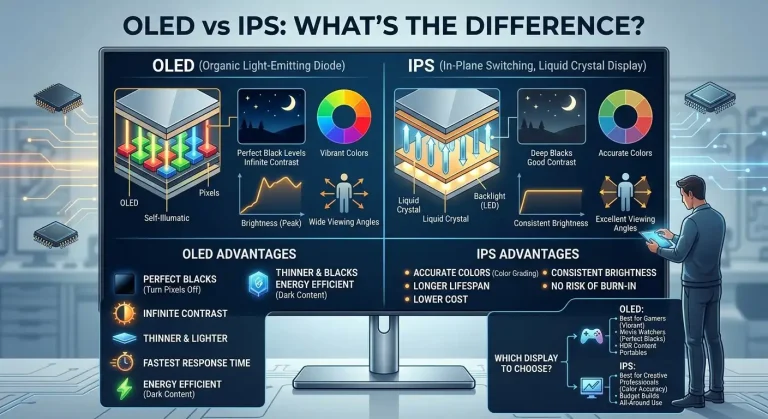
Understanding the display technology can make screen problems easier to identify. Our OLED vs IPS comparison explains how the two panel technologies differ and where each is commonly used.
Image Retention vs Burn-In in Gaming
Gaming is a common concern because many games keep interface elements in fixed positions.
Examples include:
- Health bars
- Ammunition counters
- Minimap outlines
- Scoreboards
- Player names
- Game logos
- Fixed menus
A player who spends long sessions with the same game can repeatedly expose the same pixels to similar content.
That does not mean gaming automatically causes burn-in.
The risk depends on the display technology, panel design, brightness, session patterns, and how consistently the same static elements are displayed.
Sony specifically lists video games containing static screen elements among the types of content that can contribute to OLED image-retention concerns.
For an OLED gaming display, sensible habits include:
- Avoid unnecessarily high brightness.
- Allow the display’s automatic screen-off behavior to work.
- Use built-in panel protection features.
- Vary content when practical.
- Avoid leaving a game paused on the same screen for very long periods.
These measures reduce exposure to repetitive static content, but they cannot guarantee that permanent wear will never occur.
Image Retention vs Burn-In on a Laptop
Laptop displays vary considerably, so there is no single rule for every model.
Some laptops use OLED panels, while many others use LCD-based technologies.
The distinction matters because the causes and risks associated with persistent image artifacts can differ between display types.
Potential static elements on a laptop include:
- Windows taskbar
- Application toolbars
- Browser controls
- Desktop icons
- Code editor interfaces
- Spreadsheet layouts
- Fixed application panels
An OLED laptop used for many hours each day with the same high-brightness interface has a different usage pattern from a laptop primarily used for videos, browsing, and changing content.
If a laptop develops a visible ghost image, first determine whether it changes after switching applications, using different content, and allowing the panel to rest.
Do not assume that a visible shape is permanent simply because it appeared after a long work session.
Some display problems are associated with particular laptop models and screen behavior. If you are troubleshooting a MacBook display showing an unusual stage-light effect, see our MacBook stage light effect guide.
Image Retention vs Burn-In on iPhone
The image retention vs burn-in iPhone question is particularly relevant because many iPhone models use OLED displays.
Apple currently states that the Super Retina and Super Retina XDR displays use OLED technology on applicable iPhone models, including the iPhone X, XS, XS Max, and iPhone 11 Pro models and later, excluding the iPhone SE 2nd and 3rd generation.
Apple distinguishes temporary image persistence from burn-in.
According to Apple’s current support guidance, temporary image persistence can disappear after a few minutes of normal use, while burn-in can occur under more extreme conditions such as continuously displaying the same high-contrast image at high brightness for prolonged periods.
Apple recommends several habits intended to reduce long-term OLED wear, including:
- Using auto-brightness
- Allowing the display to turn off when not in use
- Avoiding static images at maximum brightness for long periods
- Keeping the device software up to date
These recommendations are designed to reduce the effects of long-term OLED use. They are not a guarantee that a display can never develop persistent wear.
LCD Screen Retention: The Temporary Kind
The quick answer: LCD screen retention is a faint, temporary ghost of a static image — and unlike OLED burn-in, it almost always fades on its own. It’s caused by residual electrical charge in the liquid crystals, not permanent pixel wear.
Because LCDs use a backlight instead of self-emissive pixels, they can’t “burn in” the way OLEDs can. What looks like burn-in on an LCD is retention: the crystals are simply slow to relax after holding one position for hours.
How to clear it: display varied full-screen content for 15–30 minutes, lower the brightness, and let the screen rest. If the ghost is still visible after a day of normal varied use, it’s likely a panel defect rather than retention — that’s a warranty conversation.
This is also why LCD handhelds like the Nintendo Switch 2 can show temporary ghosts without any permanent damage.
What About Image Retention vs Burn-In on Reddit?
Searches for image retention vs burn-in Reddit are understandable because community discussions often contain photographs and descriptions of real-world display problems.
The problem is that users may use the terms differently.
One person may call any temporary ghost image “burn-in.” Another may use “image retention” for a persistent panel artifact.
Community reports can therefore be useful for discovering symptoms and seeing how other owners describe similar situations, but an individual post cannot establish a universal technical diagnosis.
When reading online discussions, focus on the actual behavior being described:
- Does the image fade?
- How long does it remain visible?
- Does it appear on different colors?
- Does it remain after the display has rested?
- Is the display OLED or another technology?
- Is the same static content displayed repeatedly?
Those details are more useful than the label someone puts on the problem.
What Causes Image Retention or Burn-In?
There is no single cause that applies equally to every display.
Common contributing conditions can include:
- Static images
- Repeatedly displaying the same interface
- High brightness
- Long periods of identical content
- High-contrast fixed elements
- Repeated gaming HUDs
- Persistent logos
- Uneven pixel aging
- Individual panel characteristics
The combination matters.
For example, a static logo displayed briefly is not equivalent to displaying the same high-contrast interface continuously at maximum brightness for long periods.
Sony’s OLED guidance specifically recommends avoiding prolonged or repeated display of static content, while Apple’s iPhone guidance similarly warns about prolonged high-brightness static images.
Can Image Retention Become Burn-In?
It is better not to think of temporary retention as simply progressing through a fixed sequence until it “turns into” burn-in.
Temporary image retention and permanent uneven pixel wear are different phenomena.
However, the usage patterns associated with retention can also contribute to long-term uneven wear.
Repeatedly displaying the same static content, especially at high brightness over prolonged periods, can increase exposure to conditions associated with permanent pixel aging on OLED displays.
The important distinction is that a temporary ghost image can disappear without causing permanent damage.
Conversely, persistent unevenness should not be dismissed simply because the original cause was a static image.
How to Reduce the Risk of Burn-In
You cannot guarantee that a display will never develop permanent image wear, but sensible usage can reduce unnecessary exposure to static content.
Useful habits include:
- Avoid leaving static images displayed unnecessarily.
- Use automatic screen-off features.
- Keep brightness at a sensible level.
- Vary content when practical.
- Avoid leaving games paused for very long periods.
- Use manufacturer-provided display protection features.
- Follow the care recommendations for your exact panel.
- Avoid running unnecessary panel-maintenance procedures repeatedly.
Modern displays may include protective technologies designed to reduce uneven wear.
For example, Apple describes pixel-level usage monitoring and brightness adjustment on supported OLED iPhones, while manufacturers of OLED TVs and monitors may provide their own panel-care systems.
These systems reduce risk; they do not eliminate it completely.
When Is It Probably Permanent?
No visual symptom alone can provide a guaranteed diagnosis, but several signs should make you take persistent panel wear more seriously.
Pay attention if:
- The same shape remains visible across many types of content.
- The artifact appears on multiple uniform test colors.
- The shape remains in exactly the same location.
- It does not noticeably fade after normal use.
- It remains visible after the display has been turned off and rested.
- The pattern corresponds closely to a frequently displayed static element.
At that point, continuing to run random “repair” techniques is unlikely to provide a reliable answer.
If the display is still under warranty, check the manufacturer’s support and warranty process. Persistent display artifacts may require an inspection rather than additional software troubleshooting.
For a valuable display, documenting the issue with photographs can also be useful when contacting support.
What You Should Not Do to Fix Screen Retention
When people see a persistent image, they sometimes turn to aggressive DIY methods found in forums or videos.
Avoid methods that involve:
- Opening the display
- Heating the panel
- Pressing or rubbing the screen
- Applying physical pressure to individual pixels
- Running extreme brightness cycles
- Installing unofficial display-repair software
- Repeatedly forcing panel-maintenance processes without checking the manufacturer’s instructions
These approaches can create additional problems and are not a reliable way to reverse permanent pixel wear.
Use the display’s own maintenance functions when the manufacturer provides them, and follow the instructions for the exact model.
Some manufacturers explicitly warn that certain OLED compensation procedures should not be run unnecessarily or too frequently. Sony, for example, notes that its applicable OLED compensation function can affect panel life and advises against excessive manual use.
A Practical Way to Think About the Problem
If you notice a ghost image, work through the problem in this order:
First: stop displaying the static content.
Second: use different content and observe whether the image fades.
Third: check the display using uniform colors.
Fourth: turn the display off and allow it to rest.
Fifth: repeat the observation later.
Sixth: check the manufacturer’s guidance for your specific display.
Finally: if the artifact remains consistently visible, especially across different content and after rest, consider manufacturer support or warranty evaluation.
This approach is more useful than immediately labeling the screen as burned in.
Frequently Asked Questions
Does turning an OLED display off help with image retention?
It can. Some displays use their powered-off or standby periods for panel maintenance, and manufacturers may specifically recommend allowing the display to remain off for a period of time. The exact behavior varies by model, so follow the manufacturer’s instructions rather than assuming every OLED panel performs the same maintenance routine.
Should I run a pixel-refresh or panel-cleaning feature every time I see a faint image?
No. These functions are model-specific and are not necessarily intended for frequent manual use. Some manufacturers warn that repeated manual compensation can affect panel life. Use such features only according to the documentation for your display.
Does lower brightness completely prevent OLED burn-in?
No. Lowering brightness can reduce exposure to conditions associated with OLED wear, but it does not guarantee that permanent unevenness will never occur. Usage duration, static content, panel characteristics, and other factors also matter.
Is a faint image automatically a defective screen?
No. A temporary ghost image can be a normal form of image persistence on some OLED displays. If the artifact disappears after changing content or normal use, that is different from persistent panel wear. If it remains consistently visible, especially after rest, manufacturer support may be appropriate.
What is AMOLED screen retention?
On AMOLED/OLED panels, “screen retention” usually means temporary image persistence — a faint ghost that fades within minutes of normal use. That’s different from burn-in, which is permanent uneven pixel aging. The test is simple: if it fades, it was retention; if it never fades, it’s wear.