 19 min read
OLED vs IPS: What’s the Difference and Which Display Should You Choose?
Choosing between OLED and IPS can be confusing because both technologies are used in phones, laptops, monitors, and other displays, yet they produce images in fundamentally different ways.
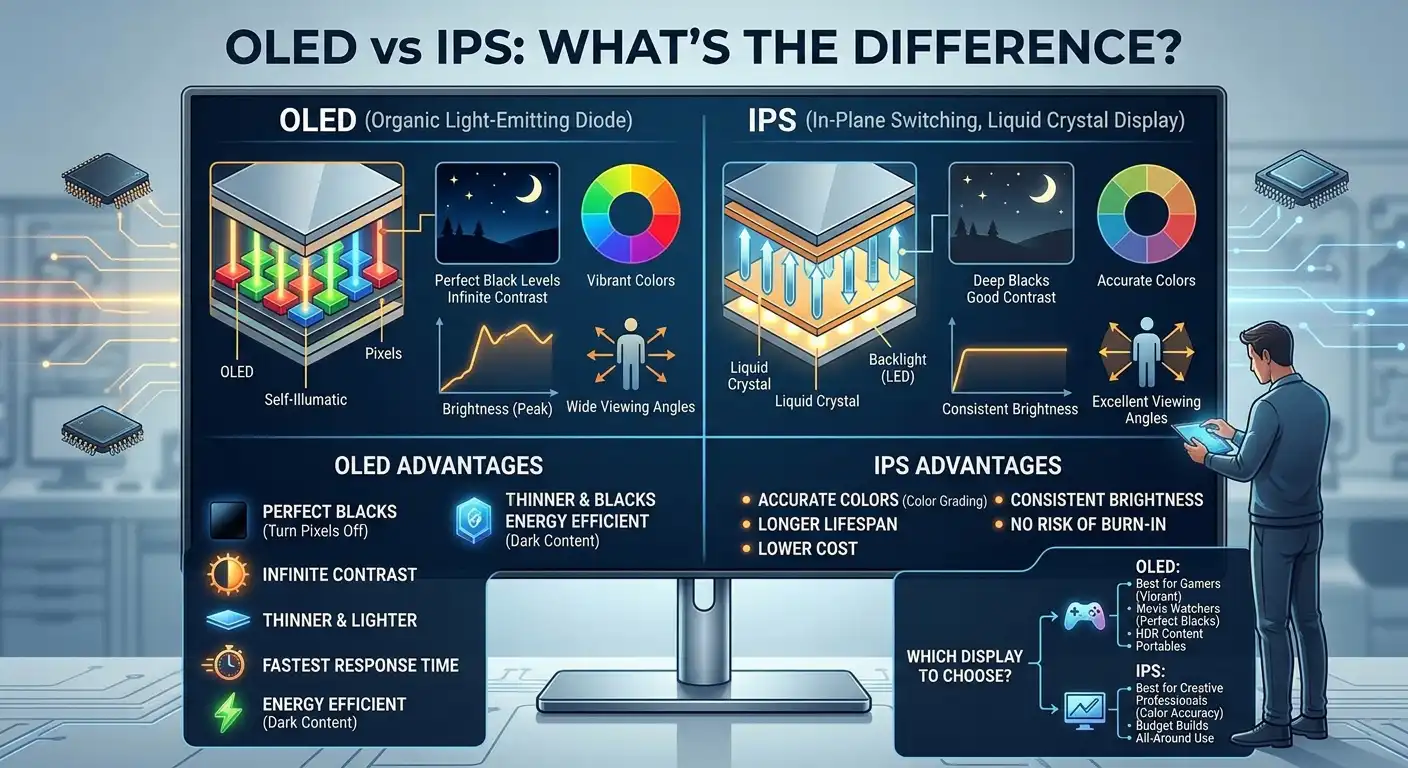
The simplest difference is that IPS is an LCD technology that uses a backlight, while OLED pixels produce their own light. That difference affects black levels, contrast, response time, viewing angles, power behavior, and the possibility of permanent image retention.
OLED usually stands out when deep blacks, strong contrast, fast pixel response, and cinematic picture quality matter most. IPS remains attractive for users who want bright displays, sharp text, predictable long-term use with static content, and a wide selection of affordable and high-refresh-rate options.
There is no universal winner. The better choice depends on whether the display is mainly being used for gaming, office work, creative work, watching movies, browsing, or a mixture of these tasks.
OLED vs IPS: The Quick Difference
| Factor | OLED | IPS LCD |
|---|---|---|
| How it produces an image | Self-emitting pixels | Liquid crystals illuminated by a backlight |
| Black levels | Excellent; pixels can turn off individually | Usually lighter blacks |
| Contrast | Extremely high | Lower on conventional IPS |
| Response time | Generally extremely fast | Generally slower, though modern IPS can be very fast |
| Viewing angles | Excellent | Very good |
| Brightness | Depends heavily on the panel and content | Often strong, especially for sustained bright scenes |
| Static-content risk | Can experience image retention and burn-in | No OLED-style burn-in risk |
| Text clarity | Can vary by OLED subpixel layout | Usually very clear with standard RGB layouts |
| Gaming | Excellent motion and contrast | Excellent range of high-refresh options |
| Office work | Excellent image quality, but static-use considerations matter | Practical for long static workloads |
| HDR | Excellent potential because of per-pixel control | Depends heavily on backlight and local dimming |
| Price | Often positioned higher | Available across a wider price range |
These are general characteristics, not guarantees for every product. OLED panel types such as WOLED and QD-OLED can behave differently, while IPS monitors also vary considerably in brightness, contrast, backlighting, and response performance.
OLED displays also have different characteristics when it comes to uneven pixel wear and temporary image retention. For a closer look at these issues, see our guide to image retention vs burn-in.
How OLED and IPS Displays Work
Understanding how the two technologies create an image makes most of their differences easier to understand.
How IPS LCD works
IPS stands for In-Plane Switching and is a type of LCD panel.
An IPS display uses liquid crystals to control how light passes through the panel. Because the liquid crystals do not produce light themselves, the display needs a backlight.
Modern IPS monitors typically use LED-based backlighting.
The backlight is always an important part of the display’s behavior because it limits how completely dark an LCD pixel can become. Even when an IPS pixel is displaying black, some light from the backlight can still pass through.
This is one reason conventional IPS displays generally cannot match OLED’s black levels.
IPS technology has nevertheless become popular because it can provide:
- Wide viewing angles
- Good color reproduction
- Strong brightness
- Sharp text
- High refresh rates
- Good response times on modern gaming models
- A wide range of resolutions and prices
How OLED works
OLED stands for Organic Light-Emitting Diode.
Unlike IPS LCD, OLED does not require a conventional backlight. Individual pixels emit their own light.
A pixel displaying black can effectively turn itself off.
That fundamental difference explains why OLED can produce extremely deep blacks and very high contrast. Samsung describes OLED monitors as using individually controlled self-emissive pixels, while IPS displays rely on a backlight.
It also explains why OLED can respond extremely quickly to changes in the displayed image.
OLED vs IPS: Picture Quality
Picture quality is one of the biggest reasons people consider OLED.
OLED’s ability to control individual pixels gives it a major advantage in dark scenes. A bright object against a black background can remain sharply separated from the surrounding darkness because the black pixels can turn off.
IPS displays can still produce excellent images, especially when they have good calibration, a wide color gamut, and effective backlighting.
However, conventional IPS cannot completely eliminate the light coming from its backlight.
This can make dark scenes look more gray than black.
OLED can therefore create a more dramatic image in movies, games, and HDR content, particularly in a darker room.
IPS remains capable of excellent color reproduction and can be preferable for some users who prioritize text clarity, brightness, or long-duration productivity.
OLED vs IPS: Black Levels and Contrast
This is where the difference between OLED and IPS is easiest to see.
OLED pixels can turn off individually. When a pixel is off, it does not need to block a separate backlight.
That allows OLED to produce extremely deep blacks and exceptionally high contrast.
IPS LCD displays have a backlight, so black areas generally retain some illumination. This is why a conventional IPS screen may make a dark scene look grayish, particularly beside a bright object.
RTINGS’ current monitor testing describes OLED as having a near-infinite contrast ratio because individual pixels can turn off, while conventional IPS monitors have much lower native contrast.
There is an important exception: Mini LED IPS.
An IPS panel paired with Mini LED backlighting can use many independently controlled backlight zones to improve contrast dramatically. It can get much closer to OLED’s visual impact than a basic IPS display.
It still does not operate at the individual-pixel level, so bright objects can produce some blooming around dark areas.
OLED vs IPS for Color
Both OLED and IPS can deliver excellent color.
The panel technology alone does not determine whether a monitor is suitable for professional color work. Calibration, color gamut, factory tuning, bit depth, software, and the specific panel all matter.
OLED often appears more vibrant because deep blacks and strong contrast make colors stand out.
IPS displays can also have wide color gamuts and accurate reproduction. High-quality IPS monitors remain widely used for photography, graphic design, video editing, and other color-sensitive work.
So instead of asking whether OLED or IPS has “better colors” in isolation, look at the actual display’s:
- Color gamut
- Color accuracy
- Calibration
- Brightness
- HDR capability
- Resolution
- Panel characteristics
OLED vs IPS for Gaming
Gaming is one of the strongest use cases for OLED.
OLED pixels can change state extremely quickly, which helps reduce visible motion blur caused by slow pixel transitions.
RTINGS’ current IPS vs OLED monitor comparison finds OLED panels generally have an advantage in motion handling because their pixel response times are extremely fast.
OLED also combines fast response with excellent contrast.
That can make dark game environments look particularly impressive.
IPS still has several advantages for gaming.
Modern IPS gaming monitors are available with very high refresh rates, high resolutions, strong brightness, and fast response times. Some competitive gamers may prefer an IPS display because they want a high-refresh panel without having to consider OLED’s long-term static-content concerns.
What about OLED burn-in while gaming?
Gaming does not automatically cause OLED burn-in.
The concern comes from repeated static elements such as:
- Health bars
- Maps
- Scoreboards
- Ammunition counters
- Game logos
- Fixed HUD elements
If the same elements remain in the same positions for very long periods, they can contribute to uneven pixel wear over time.
OLED manufacturers use different protection and compensation techniques to reduce the risk, but those systems do not make OLED completely immune to permanent image retention.
For someone who plays a wide variety of games and also watches movies or other changing content, the usage pattern is different from someone who runs the same static game interface for many hours every day.
OLED vs IPS for Laptops
The OLED vs IPS laptop decision depends heavily on how you use the computer.
OLED laptops can offer:
- Deep blacks
- High contrast
- Excellent movie quality
- Fast response
- Strong HDR potential
- Wide viewing angles
These characteristics make OLED attractive for entertainment, creative work, and visually rich applications.
IPS laptops can offer:
- Good brightness
- Sharp text
- Strong viewing angles
- Broad model availability
- Lower concern about OLED-style burn-in
- Often better value at comparable specifications
For long office sessions, an IPS laptop can be appealing because the interface contains many static elements such as the taskbar, browser controls, application menus, and document layouts.
That does not mean an OLED laptop is unsuitable for office work. It means static usage is one factor worth considering.
HP Spectre OLED vs IPS
HP Spectre models have been offered with different display configurations depending on the model and generation, so the comparison should be made using the exact laptop configuration rather than assuming every Spectre has the same panel.
An OLED version may provide stronger contrast and deeper blacks, while an IPS configuration can offer a different balance of brightness, battery behavior, and long-term static-use considerations.
Dell XPS OLED vs IPS
The same principle applies to Dell XPS systems.
Some XPS configurations have offered OLED displays while others have used LCD/IPS-type panels. Comparing the exact model, resolution, brightness, refresh rate, and power characteristics is more useful than simply comparing the XPS brand name.
HP Spectre x360 14 OLED vs IPS
For a Spectre x360 14 configuration, the choice should be based on the actual panel specifications offered for the specific generation.
If the priority is movies and contrast, OLED has a clear technical advantage in black levels.
If the laptop is primarily used for static productivity throughout the day, IPS may be attractive because it avoids the OLED burn-in consideration.
1440p OLED vs 4K IPS
The 1440p OLED vs 4K IPS comparison is not purely an OLED-versus-IPS question.
It also involves resolution.
A 1440p OLED can have better contrast, deeper blacks, and faster pixel response than a 4K IPS display.
A 4K IPS display, however, has more pixels.
On a monitor of the same physical size, 4K provides a higher pixel density than 1440p. That can make small text and detailed images look sharper, assuming scaling and viewing distance are appropriate.
For example, on a typical 27-inch monitor:
- 1440p provides roughly 109 pixels per inch.
- 4K provides roughly 163 pixels per inch.
That is a substantial difference in pixel density.
So a 1440p OLED may deliver more impressive contrast and motion, while a 4K IPS can provide a sharper desktop image.
The right choice depends on what matters more:
| Priority | More relevant choice |
|---|---|
| Deep blacks | 1440p OLED |
| Very high pixel density | 4K IPS |
| Fast pixel response | OLED |
| Desktop text at the same screen size | 4K IPS |
| HDR contrast | OLED |
| Static productivity | IPS may be preferable |
| Mixed gaming and movies | OLED is attractive |
This is why comparing only resolution or only panel type can produce the wrong conclusion.
4K IPS vs 1440p OLED for Gaming
For gaming, the GPU also matters.
A 4K display requires the graphics card to render substantially more pixels than a 1440p display.
A 1440p OLED may therefore allow a system to reach higher frame rates while still providing excellent contrast and motion performance.
A 4K IPS can provide greater image detail, but driving that resolution at a high refresh rate can require significantly more graphics performance.
Competitive players may value high frame rates and response more than maximum resolution.
Single-player gamers who sit close to a large screen may place more value on 4K resolution.
Neither is automatically the better gaming display.
120Hz OLED vs 240Hz IPS
Refresh rate is another comparison where the numbers can be misleading.
A 240Hz IPS monitor can refresh more frequently than a 120Hz OLED monitor.
At a high enough frame rate, that can provide a more responsive presentation and lower frame interval.
Approximate frame intervals are:
- 120Hz: 8.33 ms per refresh
- 240Hz: 4.17 ms per refresh
But refresh rate is not the same thing as pixel response time.
OLED generally has extremely fast pixel transitions, while an IPS panel may take longer to transition between certain colors.
That means a 120Hz OLED can still have exceptionally clear motion, while a 240Hz IPS can provide more frequent updates.
For competitive gaming, 240Hz may be more valuable if the system can consistently produce frame rates close to that level.
For mixed gaming, movies, and general use, 120Hz OLED can provide an excellent balance of motion and image quality.
OLED vs IPS for Eye Comfort
The question “IPS LCD vs OLED which is better for eyes?” does not have a universal answer.
Eye comfort depends on more than panel type.
Relevant factors include:
- Brightness
- Viewing distance
- Room lighting
- Screen reflections
- Flicker characteristics
- Refresh rate
- Text clarity
- Individual sensitivity
- How long the screen is viewed
OLED displays can have excellent contrast, which may be comfortable for some users in darker environments.
However, OLED displays are not automatically flicker-free. Display flicker behavior varies between models, and some OLED panels exhibit brightness fluctuations related to their refresh behavior. RTINGS notes that OLED monitors can show a brightness dip corresponding to refresh rate rather than conventional backlight PWM, and that flicker can matter for sensitive users.
IPS displays can also use different dimming methods. Some IPS monitors use PWM, while others may be flicker-free.
Therefore, someone who is sensitive to flicker should evaluate the specific display model, not simply choose OLED or IPS based on the panel category.
Text clarity is another consideration. Most conventional IPS displays use a familiar RGB subpixel structure that works well with computer text. OLED monitors can use different subpixel arrangements, and some can show color fringing around text. RTINGS notes that this can be more noticeable on certain OLED subpixel layouts and that higher pixel density can reduce the visibility of the difference.
AMOLED vs IPS: The Phone Version of This Comparison
The quick answer: AMOLED vs IPS is the phone-sized version of the OLED vs IPS debate. The same physics apply — AMOLED gives true blacks and higher contrast, IPS gives worry-free longevity — but on phones the differences that matter most are battery life and burn-in risk.
Most flagship phones today use AMOLED (Samsung Galaxy S series, Pixel Pro models, iPhones with Super Retina XDR displays), while budget phones and many tablets stick with IPS LCD. AMOLED’s dark-mode battery savings are real — black pixels draw no power — which is why heavy users notice the difference.
The trade-off: static UI elements (navigation bars, status icons) at high brightness can cause uneven pixel aging over long periods. If you’re choosing between two phones and one has AMOLED, you’re getting the better-looking screen — just use dark mode and avoid maximum brightness on static screens.
OLED vs IPS for Office Work
For productivity, IPS remains a strong option.
Office applications contain many static elements:
- Toolbars
- Menus
- Taskbars
- Browser tabs
- Spreadsheet grids
- Document layouts
- Application panels
If a monitor spends most of its life displaying the same desktop applications, the possibility of OLED image wear deserves consideration.
OLED can still be excellent for productivity, especially if the user also consumes media or plays games.
However, someone buying a monitor primarily for eight or more hours of static office work may reasonably prioritize an IPS display to avoid the burn-in concern.
AMOLED vs OLED vs IPS
AMOLED is often included in searches for IPS LCD vs AMOLED vs OLED, but the terminology can make the comparison confusing.
OLED is the broader display technology category.
AMOLED stands for Active-Matrix OLED.
AMOLED displays use an active-matrix system to control OLED pixels and are widely used in smartphones and other compact devices.
In practical consumer discussions, AMOLED is therefore generally a type of OLED rather than a completely unrelated display technology.
The comparison is better understood as:
IPS LCD vs OLED-based displays
rather than treating OLED and AMOLED as completely separate technologies.
AMOLED vs OLED
AMOLED is an implementation of OLED technology using an active matrix.
This is why terms such as:
- AMOLED
- Super AMOLED
- OLED
- Dynamic AMOLED
can appear together in smartphone specifications.
The exact construction, substrate, subpixel arrangement, refresh behavior, brightness, and other characteristics depend on the display.
AMOLED display vs IPS display
A modern AMOLED display generally shares the fundamental OLED advantage of independently controlled light-emitting pixels.
That means:
- Deep blacks
- Very high contrast
- Fast pixel response
- Strong viewing angles
IPS LCD instead uses liquid crystals and a backlight.
Smartphones can also have different priorities from desktop monitors, including power consumption, outdoor brightness, touch layers, and screen size.
Incell Screen vs OLED
“In-cell” describes how touch functionality is integrated into an LCD display rather than describing a completely separate image-producing technology like OLED.
An in-cell LCD can therefore still use an IPS panel.
That means in-cell screen vs OLED is not necessarily a direct apples-to-apples comparison.
An in-cell IPS LCD may integrate touch sensors into the display structure, while an OLED display produces light through its own pixels.
When comparing phones, check the actual display type instead of assuming that “in-cell” means a specific picture-quality level.
IPS LED vs OLED
The phrase IPS LED vs OLED can also cause confusion.
LED in an IPS monitor usually refers to the backlight.
The display is still an LCD.
OLED does not need that conventional backlight because its pixels emit their own light.
So:
IPS LED = IPS LCD with LED backlighting
while:
OLED = self-emissive display technology
This is one of the most important differences between the two.
Brightness: OLED vs IPS
Brightness is more complicated than simply asking which panel is brighter.
Some IPS monitors can produce very strong sustained brightness, which can be useful in bright rooms.
OLED displays can produce very bright highlights, especially in HDR, but sustained full-screen brightness behavior can differ from short-duration highlight brightness.
Samsung currently notes that OLED monitors generally have lower peak brightness than IPS panels, while OLED has an advantage in contrast and black levels.
The exact result depends heavily on the particular monitor.
If the display will be used in a room with strong daylight, sustained brightness can be more important than maximum HDR highlight brightness.
Viewing Angles
Both technologies can provide wide viewing angles, but OLED generally maintains image consistency extremely well because each pixel is self-emissive.
IPS also has strong viewing angles compared with many older LCD technologies.
For a single user sitting directly in front of the screen, the difference may not be particularly important.
For a large monitor shared by multiple people, OLED’s viewing-angle consistency can become more noticeable.
Text Clarity
Text clarity is an area where IPS can have a practical advantage.
Most IPS displays use a conventional RGB subpixel layout that computer operating systems and applications render text well with.
OLED monitors can use different subpixel arrangements depending on whether they use WOLED, QD-OLED, or another implementation.
Some OLED monitors can therefore show color fringing around small text.
RTINGS notes that text clarity varies between OLED implementations and improves as pixel density increases.
If the display will be used mainly for coding, spreadsheets, writing, or reading documents, check actual text rendering rather than judging from OLED’s picture quality alone.
Burn-In and Long-Term Use
One of the biggest differences between OLED and IPS is the possibility of permanent image retention.
OLED pixels can age unevenly, particularly when the same static elements are displayed repeatedly for long periods.
IPS does not have the same OLED-style burn-in mechanism.
That makes IPS attractive for workloads with highly static interfaces.
OLED manufacturers have introduced various protection systems, including pixel shifting, screen savers, logo detection, brightness management, and panel compensation.
These systems can reduce risk, but they do not turn OLED into a panel with zero possibility of image wear.
Long-term use should therefore be considered alongside the actual content displayed.
OLED vs IPS: Which Display Fits Your Needs?
Instead of asking which technology is universally better, match the panel to the workload.
| Your main use | What to prioritize |
|---|---|
| Competitive gaming | High refresh rate, response time, VRR behavior |
| Story-driven gaming | OLED contrast and HDR are particularly attractive |
| Movies and streaming | OLED black levels and contrast |
| Office productivity | IPS is attractive for static use and text clarity |
| Programming | IPS may have an advantage for text clarity and static interfaces |
| Photo/video work | Evaluate color accuracy, gamut, calibration, and HDR rather than panel type alone |
| Bright room | Strong sustained brightness can favor IPS |
| Mixed gaming and entertainment | OLED is a strong option |
| Long static workloads | IPS avoids OLED-style burn-in concerns |
| Maximum desktop sharpness | Compare resolution and pixel density as well as panel type |
| Sensitive to flicker | Check the specific model’s flicker behavior |
So, Is OLED Better Than IPS?
OLED has clear technical advantages in several areas: black levels, contrast, pixel response, and viewing-angle consistency.
IPS has its own practical advantages, particularly for bright-room use, static productivity, text rendering on conventional RGB layouts, broad product availability, and avoiding OLED burn-in concerns.
That is why OLED vs IPS should not be treated as a simple winner-takes-all comparison.
A gamer who wants deep blacks and extremely fast motion may prioritize OLED.
A programmer who spends most of the day looking at static code windows may prefer IPS.
Someone buying a laptop for movies may value OLED’s contrast, while another buyer may care more about sustained brightness and long-term static use.
The specifications of the individual display matter just as much as the panel label.
Final Takeaway
The fundamental difference between IPS and OLED is simple: IPS LCD uses a backlight, while OLED pixels produce their own light.
That gives OLED a major advantage in black levels, contrast, and pixel response. IPS remains highly competitive because it offers strong brightness, excellent text clarity, wide viewing angles, high refresh rates, and no OLED-style burn-in risk.
For gaming and movies, OLED is particularly compelling.
For long hours of static productivity, IPS remains a practical choice.
For laptops and phones, the decision should also consider brightness, battery behavior, resolution, refresh rate, flicker characteristics, and the exact panel used.
And when comparing something like 1440p OLED vs 4K IPS or 120Hz OLED vs 240Hz IPS, remember that panel technology is only one part of the decision. Resolution, refresh rate, pixel density, graphics performance, brightness, and your actual workload can matter just as much.
Wondering how this applies to handhelds? Our Nintendo Switch 2 screen guide examines its LCD, ghosting reports, and display issues.
FAQs:
Does OLED use more battery than IPS?
It depends on the device, panel, brightness, and what is displayed. OLED can be efficient when much of the screen is dark because individual pixels can turn off, while bright full-screen content can change the power relationship. A laptop or phone’s total battery life also depends on the processor, software, brightness, battery capacity, and other hardware.
Can an IPS display have better HDR than an OLED?
A high-end IPS display with an effective Mini LED backlight can deliver strong HDR performance and high brightness. OLED still has an advantage in per-pixel black control, but HDR quality depends on the entire display implementation rather than the panel label alone.
Does a higher refresh rate make IPS better than OLED for gaming?
Not automatically. A 240Hz IPS display updates more frequently than a 120Hz OLED, but OLED generally has much faster pixel transitions. The better choice depends on the games being played, the frame rates the system can produce, and whether the user values maximum refresh rate or OLED’s contrast and motion characteristics.
Are OLED displays thinner than IPS displays?
OLED panels can be designed thinner because they do not require the same conventional backlight structure as LCD displays. However, the final thickness of a monitor, laptop, or phone also depends on its chassis, cooling system, battery, glass, and other components.
Which is better for phones, AMOLED or IPS?
AMOLED, for most people — better contrast, true blacks, and battery savings with dark mode. IPS wins only if you keep static content on screen for very long hours daily and want zero burn-in risk, or if budget is the priority.